.png)
 Claude
 ChatGPT
 Gemini
LinkedIn has over 175 million Premium subscribers, up from around 154 million in 2022. That’s a significant shift, especially when you consider that just a few years ago, most people viewed LinkedIn as little more than a digital resume and a platform for job applications.
Today, that has changed. Founders use LinkedIn to talk about what they’re building. Consultants use it to build credibility and attract clients. Sales teams use it to find and connect with decision-makers. Executives use it to shape their public presence and make their ideas visible.
LinkedIn today is an active part of how people grow their visibility and professional presence.
Premium plans matter here; more than just unlocking shiny extras, they can help you use LinkedIn more deliberately, depending on whether you’re trying to land a role, build relationships, hire, or generate leads.
When LinkedIn Premium is compared across its various plans, Careers, Business, Sales Navigator Core, and Recruiter Lite, it’s clear that each serves a distinct purpose. However, it’s also easy to pick one based on assumptions, without understanding the actual needs.
This guide is not intended to simply list features you can already find on LinkedIn’s pricing page. It will help you think clearly about what each plan is built for, who it serves best, and when it’s worth the investment.
If you use, or intend to use LinkedIn as a meaningful part of your personal branding journey, this guide will help you choose the plan that fits your goals now and continues to support them as you grow.
Why LinkedIn Premium Exists in the First Place
If you’re just starting out on LinkedIn, LinkedIn's free basic tier works well enough. But once you start doing more than casual browsing, the limitations become apparent. They affect who you can reach, who sees you, and how much you can engage.
- You can send up to 100 connection requests per week. While users can send personalized notes along with connection requests, LinkedIn only allows up to 5 of them.
- Free accounts let you view about 500 profiles per day, which can be limiting for recruiters, and viewing too many profiles can also get your account restricted.
- You’ll only see a handful of people who viewed your profile, and even that visibility can disappear if your account becomes inactive or you hit certain usage limits.
- Messaging beyond your first-degree network is mostly restricted, unless you're messaging someone with an "Open Profile".
Premium plans are designed to let you reach further, notice what’s working, and choose your next steps with more clarity:
- Premium plans provide InMail credits (e.g., 5–15 per month for Career or Business, 50 for Sales Navigator), allowing you to message people outside your network intentionally.
- You also get to see full lists of who's viewed your profile (last 365 days), rather than a small, limited snapshot.
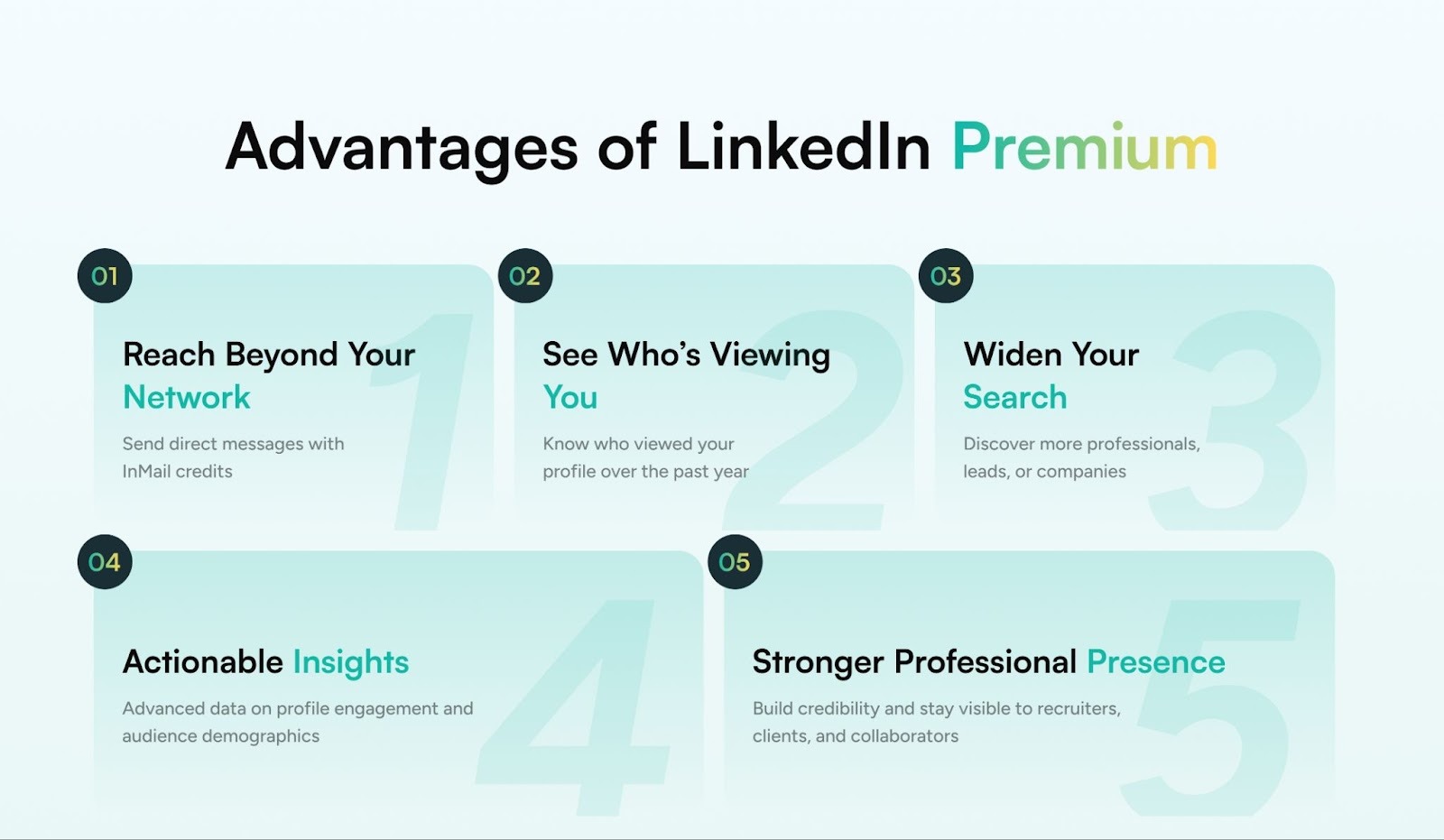
The real point: these tools expand your options as a professional and let you see and be seen by the right people.
But when it comes to picking the right fit for you, it’s more than a feature checklist exercise. If you choose a plan based on features alone, you risk overspending on tools you do not need or missing capabilities that would genuinely help you. For instance, Sales Navigator Core is excellent for large-scale, targeted outreach, but it offers little value if your primary aim is to secure a new role or grow your content presence.
So you might want to think about what you want to get out of your Premium subscription:
- Are you applying for jobs and want better visibility with recruiters?
- Are you building a LinkedIn audience to turn content into discovery calls?
- Do you need large-scale outreach with precision and filters?
LinkedIn Premium Plans Explained with Use Cases
The right LinkedIn Premium plan provides different ways to use the platform depending on what you're trying to achieve. Here's how to think about each one strategically, based on your goals, stage, and how you spend your time on LinkedIn.
1. Career Plan
Best for: Active job seekers, early-career professionals, career switchers
Price range: $29.99/month
If you’re in the market for a new job, especially in a competitive field, the Career Plan helps you get better visibility with recruiters and hiring managers. It also gives you a clearer picture of where you stand: who’s viewing your profile, how you compare to other applicants, and what keywords show up in your profile searches.
What you get:
- Who’s viewed your profile (for the last 365 days)
- Applicant insights (how you stack up against others applying for the same role)
- Ability to message recruiters via InMail (5 InMails per month)
- Access to 22,000+ LinkedIn Learning courses to brush up on skills
- Featured Applicant status in job listings
- Salary and company insights
- Access to interview preparation tools
Valuable Features
- Hiring Trends:
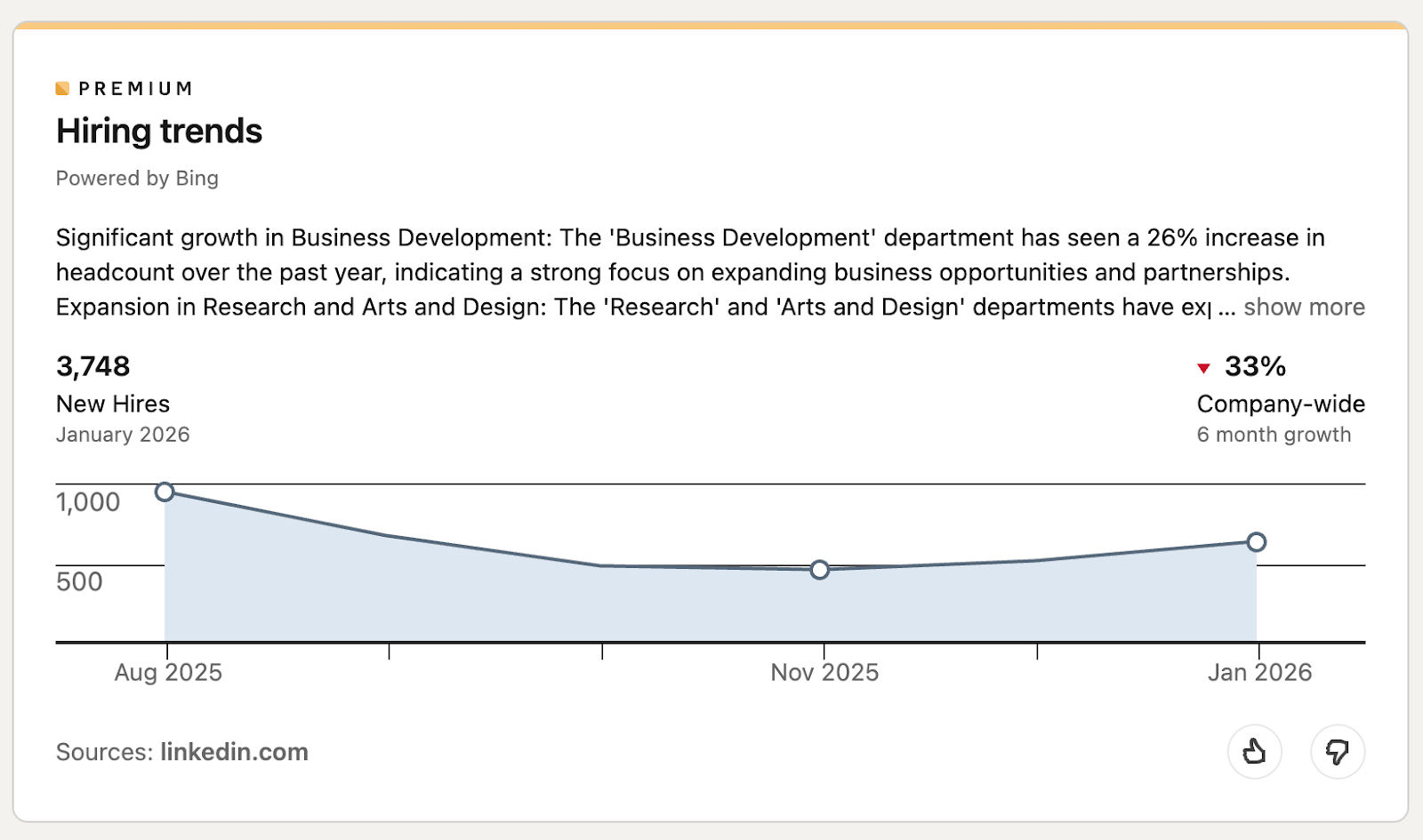
- Openings by Functional Distribution based on data:
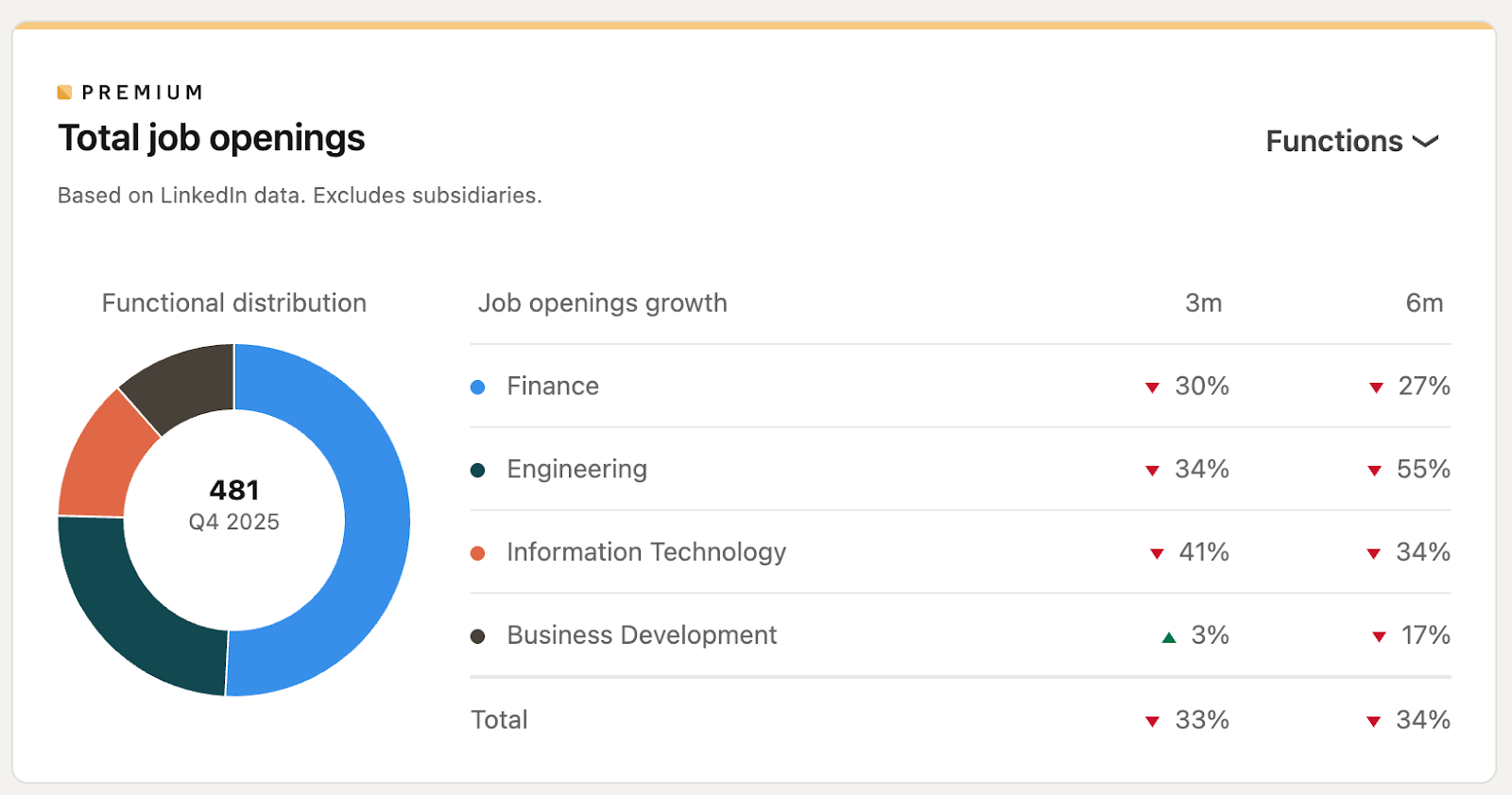
- Insights like employee distribution
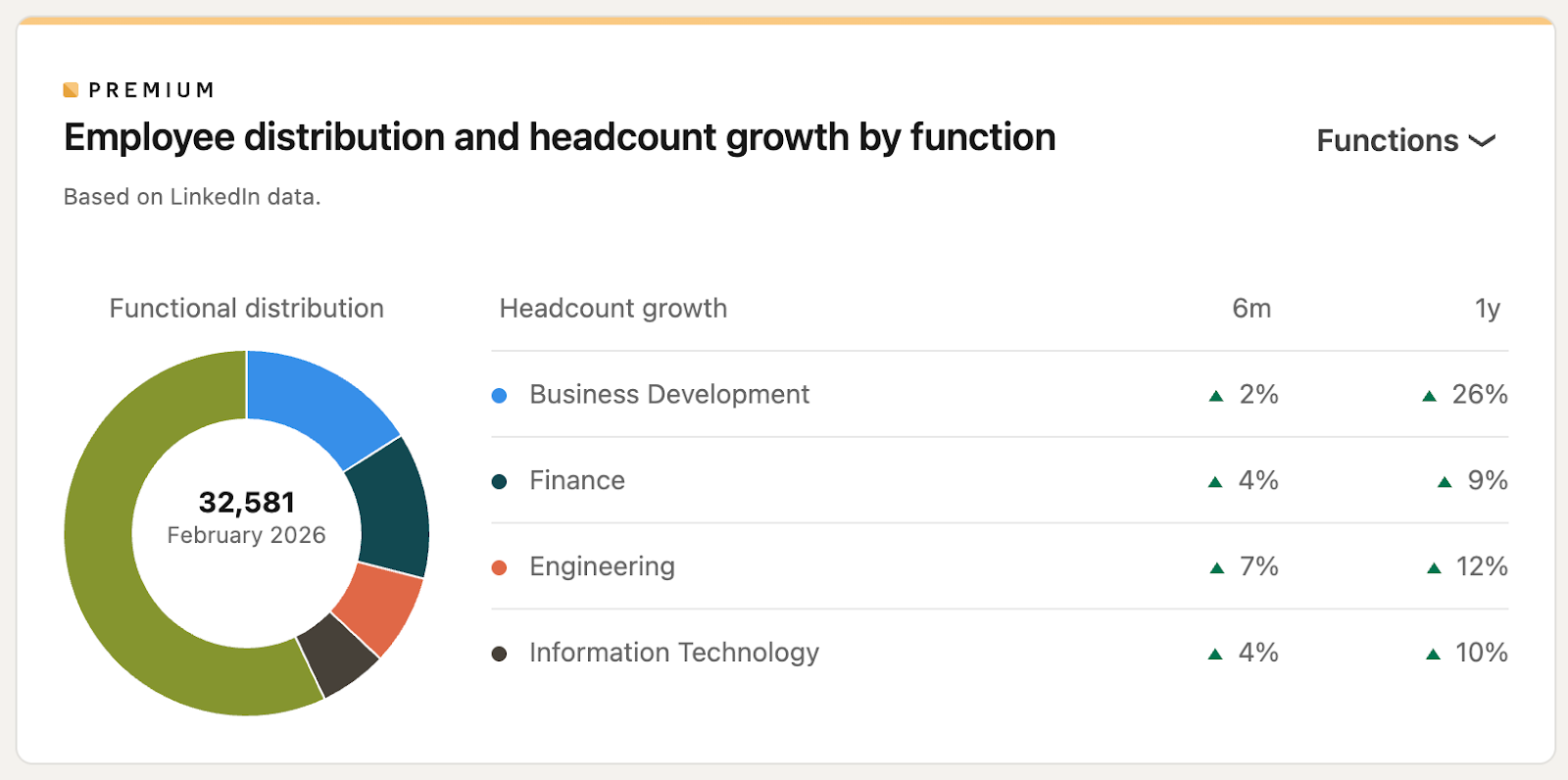
Example scenario:
A mid-level marketing professional applying to 10–15 roles a week can use the Career plan to track which companies are viewing their profile, follow up directly with recruiters, and tailor their profile based on keyword insights.
Where it falls short:
This plan is built for job-hunting, not for building an audience or attracting clients. If your goal is to grow a presence or generate leads, you’ll quickly outgrow it.
2. Business Plan
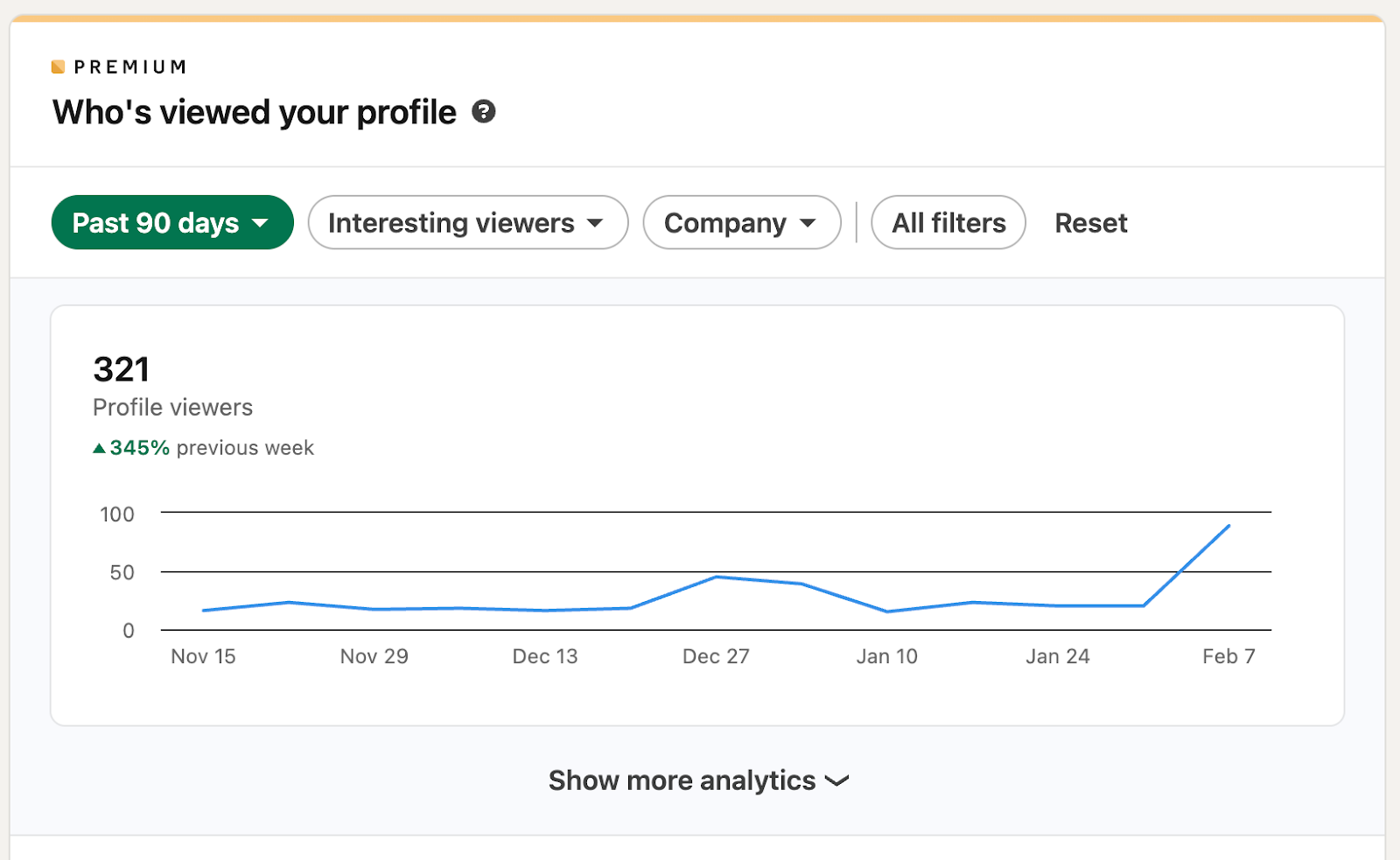
Best for: Solopreneurs, consultants, freelancers, and early-stage founders
Price range: $59.99/month
The Business Plan is a strong choice if you're building visibility, starting to post content, or trying to grow a strategic network. It gives you more InMail credits, better search capabilities, and full visibility into who’s viewing your profile, helpful if you're turning views into conversations.
What you get:
- Extended search filters (including company size, seniority, and function)
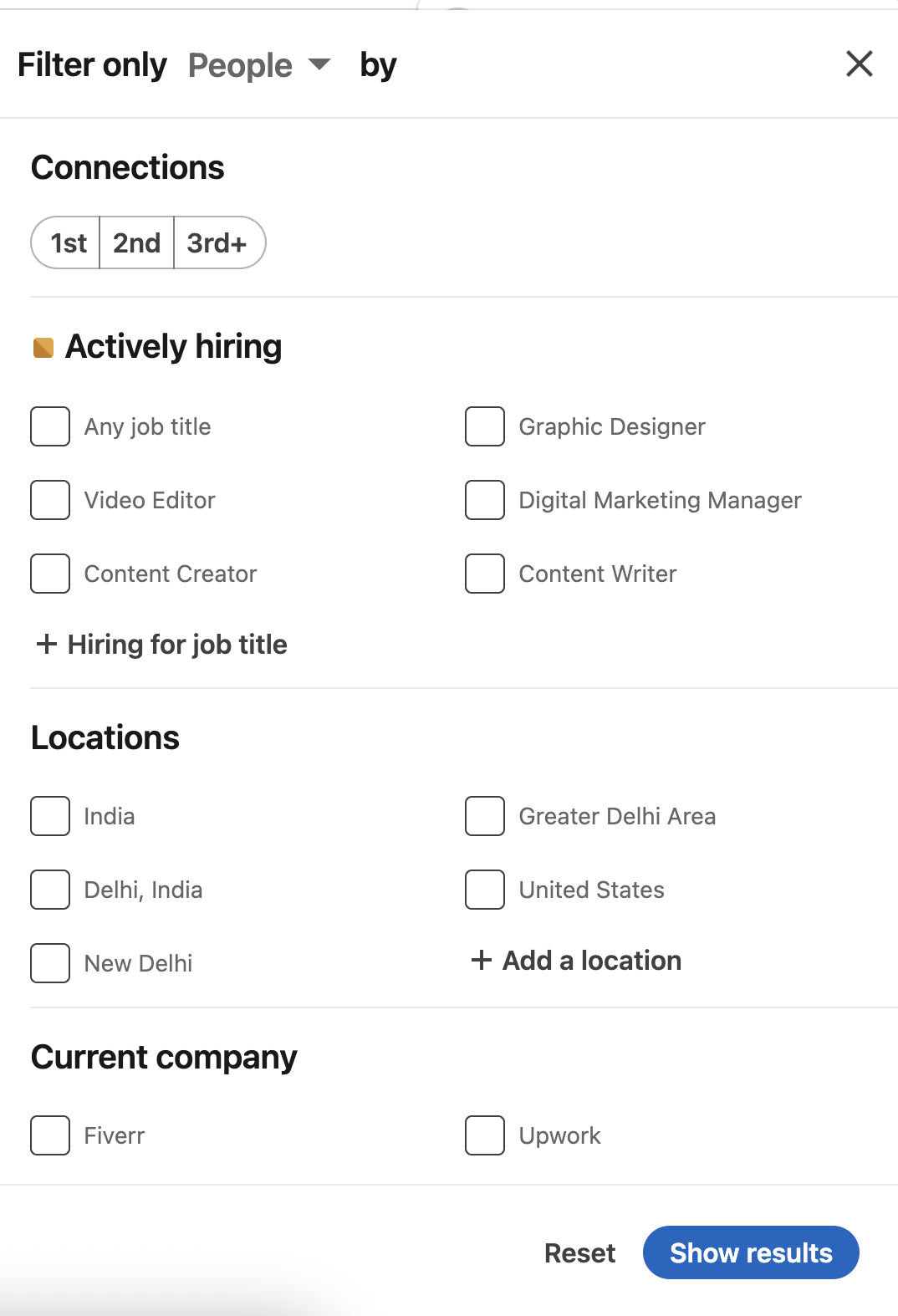
- More profile visibility
- 15 InMail credits per month
- Access to LinkedIn Learning
- Insights on companies and connections
Example scenario:
A freelance UX consultant who posts weekly content can use the Business Plan to track profile views, reach out to leads who aren’t in their network, and refine search results when researching companies or decision-makers.
Strategic value:
Strong for personal brand building, especially in the early stages. It’s not a mass outreach tool, but it can be a useful foundation for relationship-building and organic lead generation.
Where it falls short:
If your primary activity on LinkedIn is outbound sales or hiring, the Business Plan doesn’t give you the filters or workflow tools to manage those efficiently.
3. Sales Navigator Core
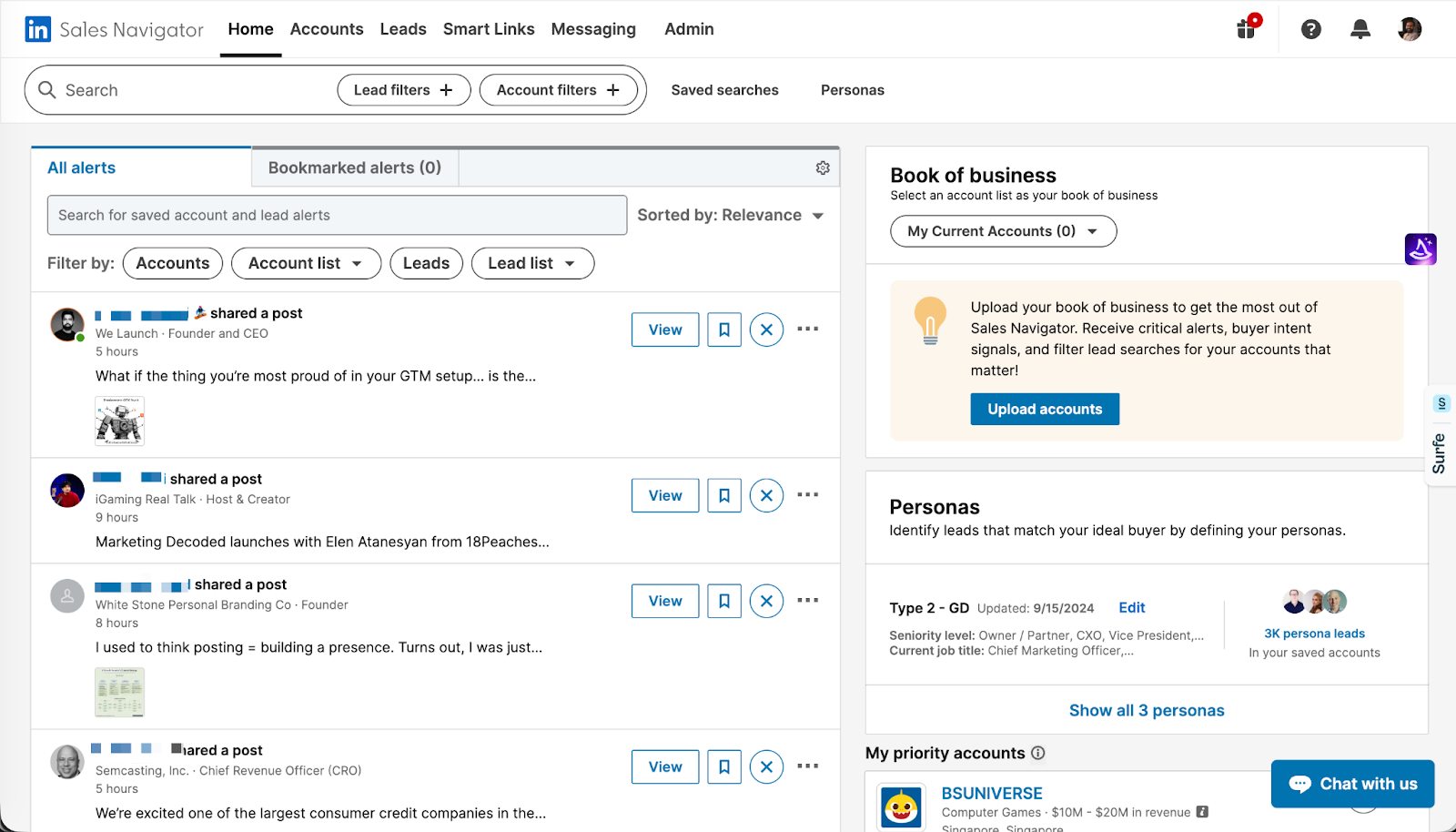
Best for: B2B founders, growth teams, sales professionals, and agency owners
Price range: $99.99/month
Sales Navigator Core is designed for focused, high-volume prospecting. It’s best used by people who need to build and manage lead lists, target specific personas, and track relationship touchpoints across multiple accounts.
What you get:
- Advanced search filters (seniority, geography, function, recent activity, etc.)
- Lead lists and saved account targeting
- 50 InMail messages per month
- Integration with CRM tools
- Alerts based on buyer intent and account activity
Example scenario:
A B2B SaaS agency with a 3-person sales team uses Sales Navigator Core to build segmented lead lists by role and industry, track who’s engaging with content, and send tailored outreach messages at scale.
Why it works:
It’s a powerful tool when used consistently and with a clear process. For small teams that treat LinkedIn as a primary growth channel, it can pay for itself within weeks.
Where it falls short:
It’s overkill for occasional users or people still refining their offer. It also takes time to learn and integrate into your daily workflow. Without that discipline, most of its value goes unused.
4. Recruiter Lite
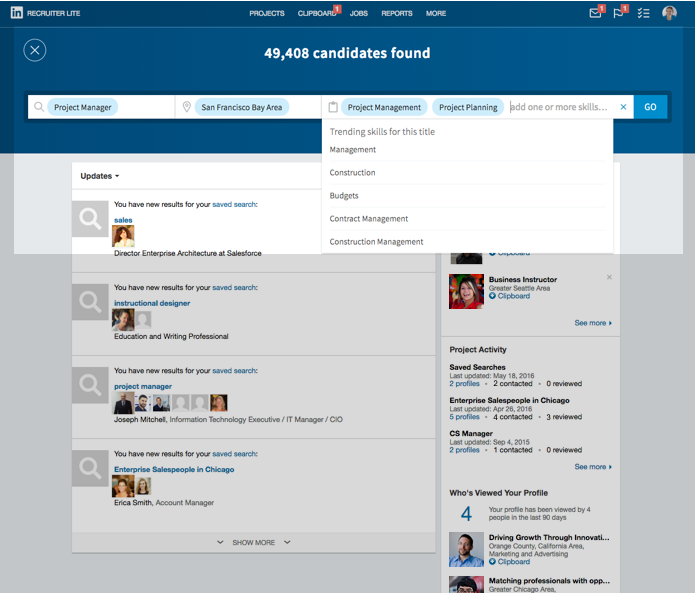
Best for: In-house recruiters, solo founders building early teams, boutique hiring agencies
Price range: Starts at ~$170/month for Recruiter Lite; higher for full version
Recruiter plans are built for talent acquisition. They’re focused on helping you identify, organize, and reach potential hires.
What you get:
- Advanced search for candidate discovery (years of experience, job titles, skills, etc.)
- Messaging tools and project folders
- Candidate tracking workflows
- Smart suggestions based on hiring patterns
Example scenario:
A startup founder hiring their first 5–10 employees across engineering and marketing can use Recruiter Lite to find passive candidates, organize outreach, and keep notes across profiles without leaving the platform.
Note:
These plans are priced for teams with consistent, ongoing hiring needs. If you’re only filling one or two roles per year, it’s hard to justify the cost.
Summary: LinkedIn Premium Compared at a Glance
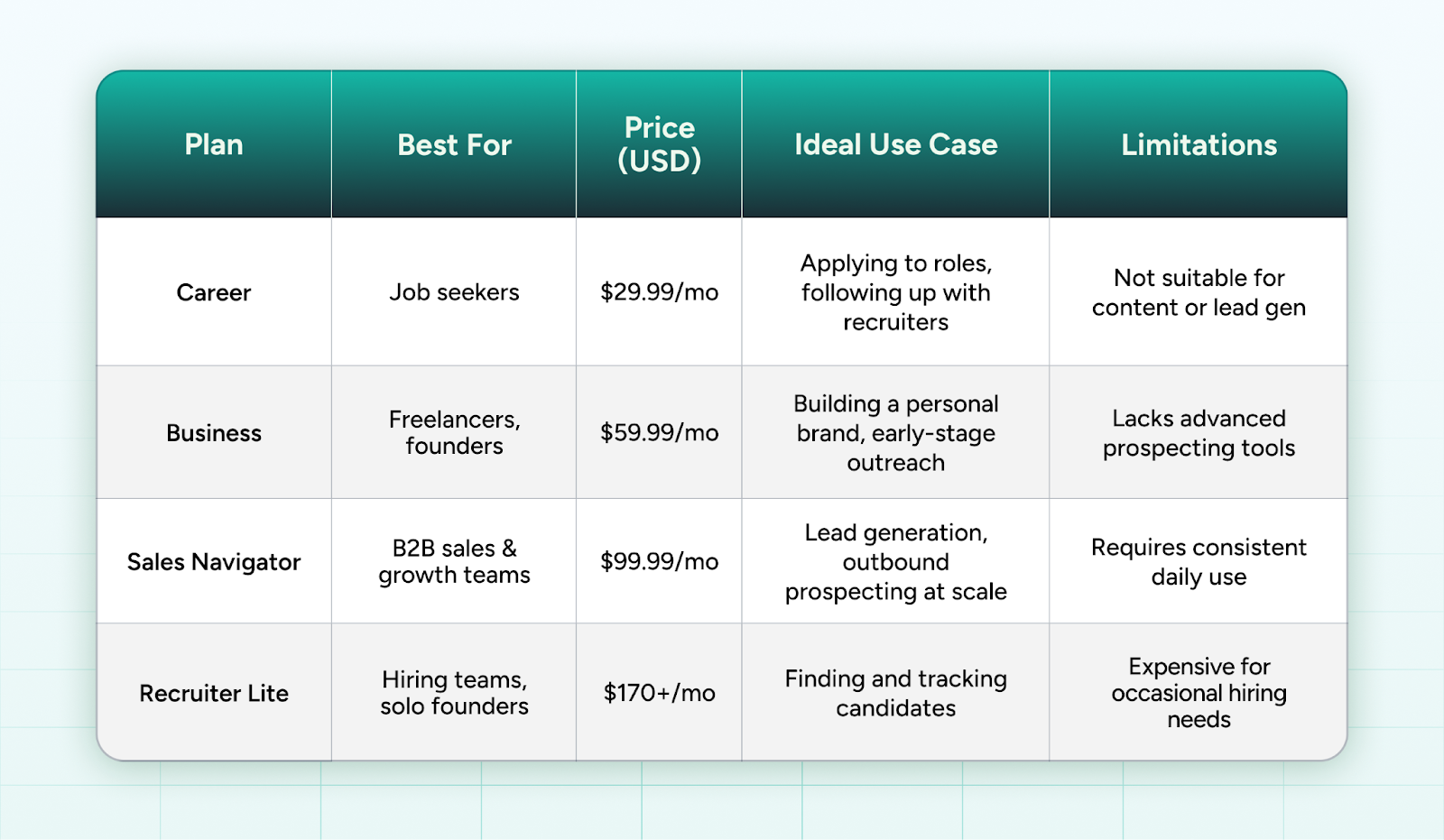
*Prices mentioned are indicative and may vary by region or change over time. Please refer to LinkedIn’s official Premium page for the latest pricing and feature updates.
How to Choose: A Fit Over Feature Comparison
Choosing a LinkedIn Premium plan means knowing what you're really trying to accomplish and whether the tools actually support that effort in a sustainable way.
Before signing up, it helps to pause and ask a more useful question than “Which plan has the most features?” Instead, ask: What exactly do I need LinkedIn to do for me over the next quarter or two?
Here’s a straightforward way to think through it:
What Are You Using LinkedIn for Right Now?
Most professionals fall into one of these four categories. Each use case points to a different plan:
- If you’re applying for roles or actively searching for new opportunities, the Career Plan offers the essentials: profile visibility, applicant insights, and recruiter outreach.
- If your focus is on growing your network, sharing your work, and being more discoverable, the Business Plan offers enough search and visibility features to support that.
- If LinkedIn is part of your revenue engine, especially through outreach or lead generation, Sales Navigator gives you the precision and volume that the others can’t match.
- If you’re spending time hiring or building a team, even as a founder or solo operator, Recruiter Lite provides better access to passive candidates and hiring workflows.
This isn’t about where you might be six months from now. It’s better to think about what you need the platform to support today, rather than six months from now. If your priorities shift, your plan can too.
What Else Should You Consider Before Upgrading?
Beyond your goals, a few practical questions can help you make a more informed decision.
- Will you actually use the features?
Premium features only matter if you log in often enough to use them. If you’re not planning to send InMails, review analytics, or conduct advanced searches weekly, some of the value will sit idle.
- Is the outcome trackable?
Good tools are measurable. If you can define what you are looking for, more recruiter responses, more qualified leads, more content visibility, and check in on it monthly. If not, it becomes hard to justify the cost over time.
- Does this fit into a broader strategy?
If your use of LinkedIn is mostly reactive, like liking posts, browsing occasionally, and updating your profile once in a while, Premium is unlikely to move the needle. These plans work best when they support a greater, deliberate effort. That could be publishing regularly, reaching out to new people each week, or hiring proactively.
LinkedIn Premium isn't a fix for inactivity. It works when it's attached to intent.
Who Shouldn't Upgrade Just Yet?
If you’re still figuring out your goals or using LinkedIn infrequently, it might make more sense to stay on the free tier. Explore what’s possible. Build a habit of using the platform with purpose. Once you start noticing where the friction is, limited search, blocked messaging, and lack of profile visibility, you’ll have a much clearer signal for which plan makes sense.
GrowedIn’s Point of View: When Premium Is Worth It, and When It’s Not
Most people don’t ask if they should get LinkedIn Premium. They assume they’re supposed to.
They see the gold badge, the promise of more views or better connections, and the “free 30-day trial” call-to-action. The upgrade feels like progress. But that’s often where the value stops: not because Premium isn’t useful, but because it wasn’t the right time or the right context.
At GrowedIn, we work with founders, consultants, and executive teams who want to use LinkedIn with precision. And one thing we’ve learned across hundreds of client journeys is this: Premium only pays off when it supports a strategy that already exists.
When Premium Doesn’t Move the Needle
It’s easy to assume that a paid plan will “unlock” visibility or accelerate momentum. But here’s where many professionals get stuck:
- They upgrade without a clear reason.
- They don’t post or engage regularly.
- They aren’t reaching out to people consistently.
- They haven’t defined what success looks like: job leads, sales conversations, or profile visits from the right people.
In these cases, Premium becomes a background subscription. It’s there, but it’s not doing anything.
When Premium Becomes a Multiplier
On the other hand, when you’re already active, publishing content, reaching out with purpose, or building a network in a specific direction, LinkedIn Premium can start to compound your results.
Here’s what that looks like in practice:
- A founder who uses Sales Navigator to identify 100 ideal prospects each month, then sends custom messages and tracks engagement.
- A senior executive who leverages Premium insights to understand audience demographics, tailor thought-leadership content, and connect with industry peers strategically.
- A consultant using the Business Plan to identify profile viewers, follow up with warm leads, and supplement their outbound strategy.
In each of these scenarios, the user isn’t hoping Premium will create momentum. They already have momentum. The tool helps them use it better.
What We Advise Our Clients Before They Upgrade
We don’t recommend Premium until we’ve asked a few key questions:
- Are you already using LinkedIn strategically?
If LinkedIn is still just a digital résumé or a passive platform, hold off. Get the fundamentals in place first. - Do you know what you want LinkedIn to do for you?
Is it a hiring channel? A lead funnel? A content distribution tool? If you don’t know, a free account is still enough to explore and figure that out. - Is there a consistent habit in place?
Premium helps when you're already connecting, writing, researching, or messaging. If those habits are missing, it won’t solve for them. - Can you measure success?
Whether it’s profile views from the right people, responses to messages, or qualified calls booked, there should be a way to check if the tool is actually working.
If the answers to these questions are mostly “no,” we suggest staying on the free version.
LinkedIn Premium Is a Lever, Not a Ladder
More than the plan you choose, your clarity determines the outcome. LinkedIn Premium is best seen as a lever, something that helps you move faster or more efficiently once you’ve already decided where you’re going.
So, is Premium worth it?
Only if you're already doing the kind of work that makes its features useful. Otherwise, it’s just a paid illusion of progress.
Don’t Evaluate a LinkedIn Plan Like a Software Trial
It’s easy to sign up for a 30-day free trial and look for quick wins. But LinkedIn doesn’t work that way, not if you’re playing a long game. Visibility, trust, and positioning don’t spike in a few weeks. They build over quarters.
So when you’re evaluating LinkedIn Premium, ask:
- Where do I want to be visible three months from now?
- What kind of conversations do I want to be in?
- Who needs to see my work and how often?
Short-term activity doesn’t always signal long-term direction. A strategic Premium plan should be chosen based on where you’re headed, not where you happen to be today.
Treat LinkedIn Like a Serious Growth Channel
If you’re a founder, consultant, or team leader trying to be seen as a category leader, LinkedIn shouldn’t be an afterthought. It belongs in the same conversation as your PR strategy, your pitch deck, and your outbound sales motion.
Premium will not replace those systems, but when used well, it can amplify them. It gives you better control over how you show up, who sees your profile, and how you open doors.
Final Reflection
LinkedIn Premium can be valuable, but only when it supports a clear purpose. The best results come when you already know what you are trying to achieve, whether that is growing visibility, building authority, generating leads, or attracting opportunities. It works when it complements a consistent strategy, not when it replaces one.
If you are ready to turn LinkedIn into a structured channel of credibility, visibility, and growth for your business or personal brand, GrowedIn can help you do it right. Feel free to schedule a discovery call to learn more.

Frequently Asked Questions
Is LinkedIn Premium worth it for everyone?
No. Premium plans are useful only when they support a clear purpose, like job search, lead generation, hiring, or brand-building. Without that direction, most features go unused.
What’s the difference between Career, Business, Sales Navigator Core, and Recruiter plans?
Each plan serves a distinct use case:
- Career is for job seekers.
- Business is for visibility and relationship-building.
- Sales Navigator Core is for outbound lead generation.
- Recruiter is for hiring workflows.
Choosing based on your goal is more important than comparing features.
Can I just try the free trial and decide later?
You can, but trials often create urgency without strategy. If you don’t already know what you’re testing for, you likely won’t get meaningful results in 30 days.
Do Premium plans help with content reach?
Indirectly. LinkedIn doesn’t boost your content just because you’re a Premium user. But you get more visibility into who’s viewing your profile, which helps you turn that interest into a connection.
What if I’m just starting to use LinkedIn seriously?
Start with a free account. Build consistency, understand your platform habits, and upgrade only when you hit limitations that slow down your growth.
Is Sales Navigator Core worth it for solopreneurs?
Yes, but only if outbound prospecting is a core part of your strategy. Otherwise, Business Premium might be a more manageable and focused entry point.
Can GrowedIn help me decide which plan fits?
Yes. We regularly help clients align their LinkedIn goals with the right tools: whether they need content strategy, profile positioning, or team-wide Premium rollouts.
LinkedIn Premium Plans Compared: Which One Should You Choose?
- Premium plans are only valuable when aligned with clear goals.
- Each plan serves a distinct purpose; don’t treat them as upgrades.
- Free trials don’t guarantee clarity unless you know what to test.
- Premium doesn’t boost content directly; it boosts context and visibility.
- Start with free if you’re still building habits or direction.
- Sales Navigator is powerful, but overkill for casual users.
- GrowedIn helps professionals and teams choose and use LinkedIn strategically.


Insights Hub
Employer Branding on LinkedIn
The Best Time To Post on LinkedIn In 2026