.png)
 Claude
 ChatGPT
 Gemini
Every minute, more than 17,000 new connections are made on LinkedIn. That’s 17,000+ potential collaborations, hiring opportunities, partnerships, or clients being unlocked every single minute.
This access is one of the platform’s greatest strengths. LinkedIn allows you to reach professionals you may never meet otherwise, regardless of where they live or what stage they are at in their careers.
LinkedIn also allows you to build a network of up to 30,000 direct connections. These are people you can message directly and whose profiles you can explore, depending on what they choose to make visible.
But if you’ve spent time on LinkedIn, you’ve likely noticed the small “1st,” “2nd,” or “3rd” markers next to people’s names.
In this article, we’ll break down what these degrees of connection mean and why understanding them is key to making the most of your LinkedIn networking.
Connections vs. Followers: What’s the Difference on LinkedIn?
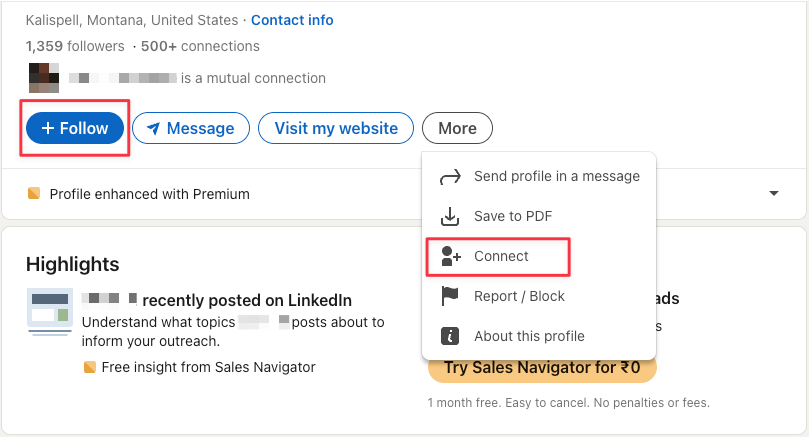
Followers:
This is a one-way relationship. Anyone can follow you without needing your approval. Followers see your posts in their feed and can engage with them, but they cannot message you directly unless you allow open messaging in your settings.
Connections:
This is a two-way relationship. You send a connection request, and the other person must accept it. Once connected, you can message each other directly, and you also gain access to the contact information they’ve chosen to make visible.
Why does this matter?
With connections, you get direct access to the person through messaging. This is one of LinkedIn’s biggest networking advantages. With followers, you get reach and visibility. They can engage with your content, which builds credibility, but you don’t get direct communication.
Best Practice for Building Connections
A smart way to grow your network in a way that is genuine, strategic, and mutually valuable is:
1. Follow first: Start by following the person and engaging with their posts. This introduces your name without asking for anything upfront.
2. Engage meaningfully: Leave thoughtful comments, ask relevant questions, or share a useful insight. When someone sees your name repeatedly in a positive context, they are much more likely to connect.
3. Send a connection request: When the time feels right, send a connection request with a short personalized note. Reference your earlier interactions. This significantly increases your chances of being accepted and creates a warm entry point for conversation.
Limits and Numbers
Connection Limits
You can have a maximum of 30,000 1st-degree connections on LinkedIn. Once you reach this limit, your profile will automatically switch to a “Follow” button as the default option. You will not be able to send or accept new connection requests unless you reduce the network size by removing existing connections.
Follower Limits
There is no limit on followers. Anyone can follow you, which makes followers a powerful way to expand your reach.
Visibility
Up to 500 connections, LinkedIn shows the exact number on your profile. Beyond that, it displays “500+”. This is a subtle signal of credibility, experience, and long-term activity in the LinkedIn community.
Follower counts, however, are always shown accurately, making them a stronger public indicator of influence and content reach.
Profile Settings: Connect vs. Follow
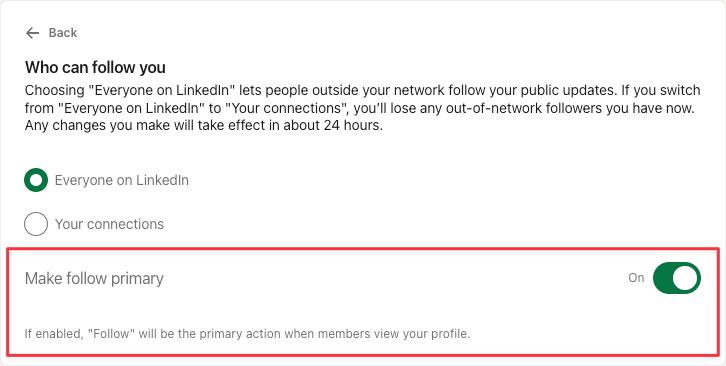
LinkedIn also lets you decide what your primary button should be:
Some prefer “Connect” to encourage more direct networking. Others choose “Follow” to focus on content visibility and audience building.
If you are building an audience, we recommend the primary button be ‘Follow’.
When you connect with someone, you automatically follow them. But if you only follow someone, it doesn’t mean you’re connected.
Now, before talking about how to make every connection valuable and why you shouldn’t mindlessly connect with everyone, let’s quickly discuss the degrees of connection and what they mean to you.
Degrees of Connection: How Your LinkedIn Network Works
1st-Degree Connections
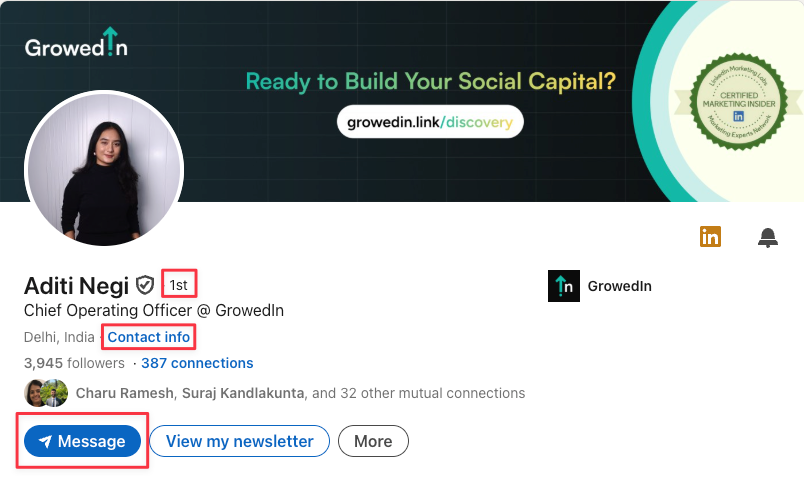
Your 1st-degree connections are your direct connections on LinkedIn. These are people you sent a connection request to, and they accepted, or individuals who invited you, and you accepted.
When you connect with someone, you both automatically follow each other. This means whenever you post or share updates, your 1st-degree connections are the first to see them in their feed.
You also gain full access to the information they’ve chosen to make visible on their profile, including their contact details. Most importantly, you can message them directly, which is one of the biggest advantages of being connected.
1st-degree connections make it easier to get introductions to their own network (your 2nd-degree connections), expanding your reach even further.
2nd-Degree Connections
These are the connections of your connections. In other words, you’re not directly connected with them, but at least one of your 1st-degree connections is.
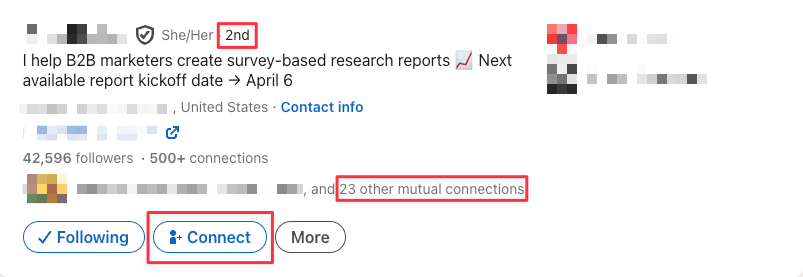
When you view a 2nd-degree profile, LinkedIn shows you your mutual connections, essentially, which of your 1st-degree contacts are connected to them. This can be a useful starting point if you want a warm introduction.
With 2nd-degree connections:
- You have limited profile visibility; you won’t see their full details or contact info.
- You cannot send them a direct message unless you first connect with them.
- However, if you have a LinkedIn Premium plan (such as LinkedIn Premium, Sales Navigator, or Recruiter), you can reach out via InMail.
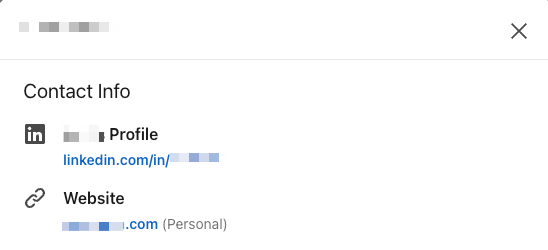
Also, while you can click the “Contact Info” button on their profile, you won’t be able to view their actual email or phone number unless you become a 1st-degree connection.
3rd-Degree Connections
These are the connections of your 2nd-degree connections, essentially, people who are outside your immediate and extended circles. Most profiles on LinkedIn that are not your 1st or 2nd-degree will fall into this category.
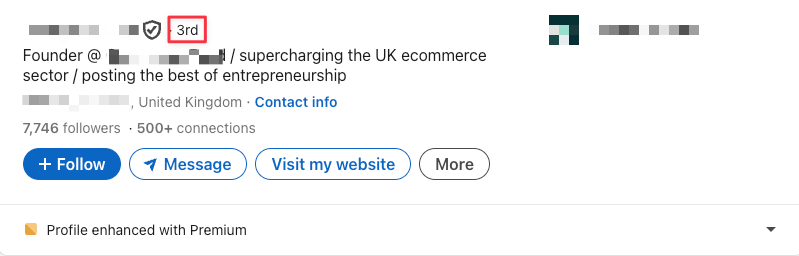
With 3rd-degree connections, you get very limited visibility of their profile (often just their name, headline, and a few details).
If someone has an Open Profile (a LinkedIn Premium feature), you can message them without needing to connect first.
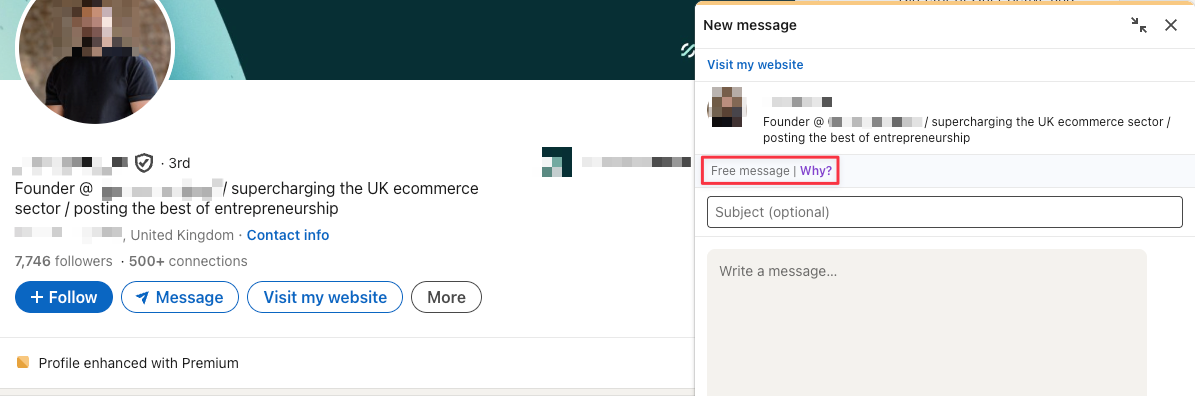
Otherwise, you’ll need to either:
a) Send them a connection request (found under More → Connect)
b) Use InMail messaging via LinkedIn Premium tools such as Premium, Sales Navigator, or Recruiter
c) If you share a group or have attended the same LinkedIn event, you may be able to message them directly without connecting.
Just like with 2nd-degree connections, once they accept your connection request, they immediately become your 1st-degree connection, giving you full access and direct messaging.
3rd+ Degree Connections
In some cases, LinkedIn shows you a 3rd+ degree connection. This simply means the person is more than two steps away in your network (beyond your 3rd-degree).
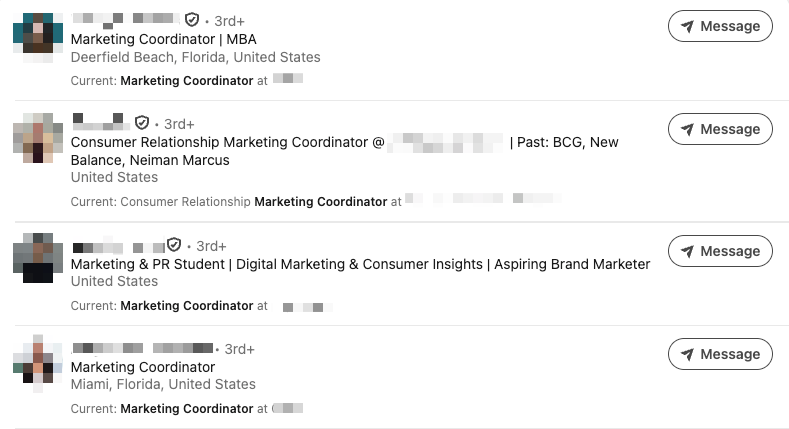
The experience is almost the same as with 3rd-degree connections:
- You get very limited visibility of their profile.
- You cannot message them directly unless you send a connection request and it’s accepted, or you use InMail through a LinkedIn Premium plan.
- If they have an Open Profile, you may still be able to message them without connecting.
In short, 3rd+ degree connections are simply further removed from your network, but the interaction rules remain similar to 3rd-degree connections.
Search Filters & Degrees of Connection
Degrees of connection play an important role when you search for people on LinkedIn. You can filter results to show only 1st, 2nd, or 3rd degree connections depending on your goal.
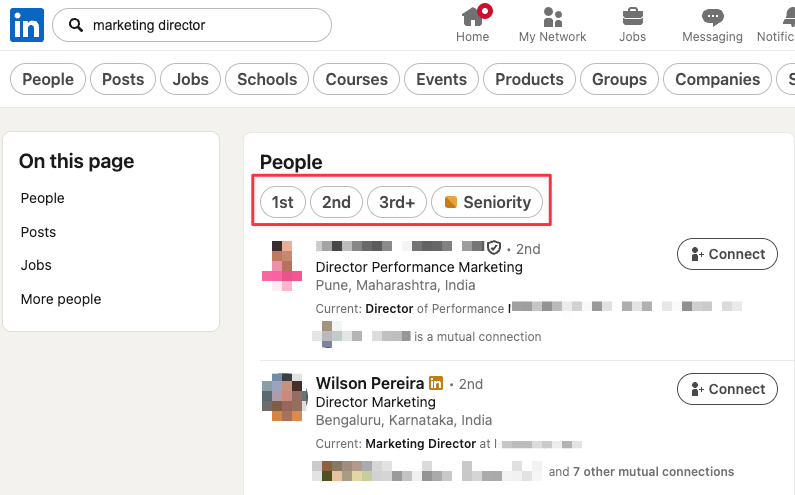
For example, if you’re looking for potential leads, you might focus on 2nd-degree connections (since you already share a mutual contact who can introduce you). If you want to expand your reach, you can go broader and explore 3rd-degree connections.
With a Premium or Sales Navigator account, these filters get much more powerful.
You can go deeper by applying advanced filters like:
- Seniority level (entry, manager, director, VP, CXO, etc.)
- Company headcount (size of the organisation)
- Industry and function
- Years of experience
- Current vs. past company
- Geography and region
- Keywords in title or profile
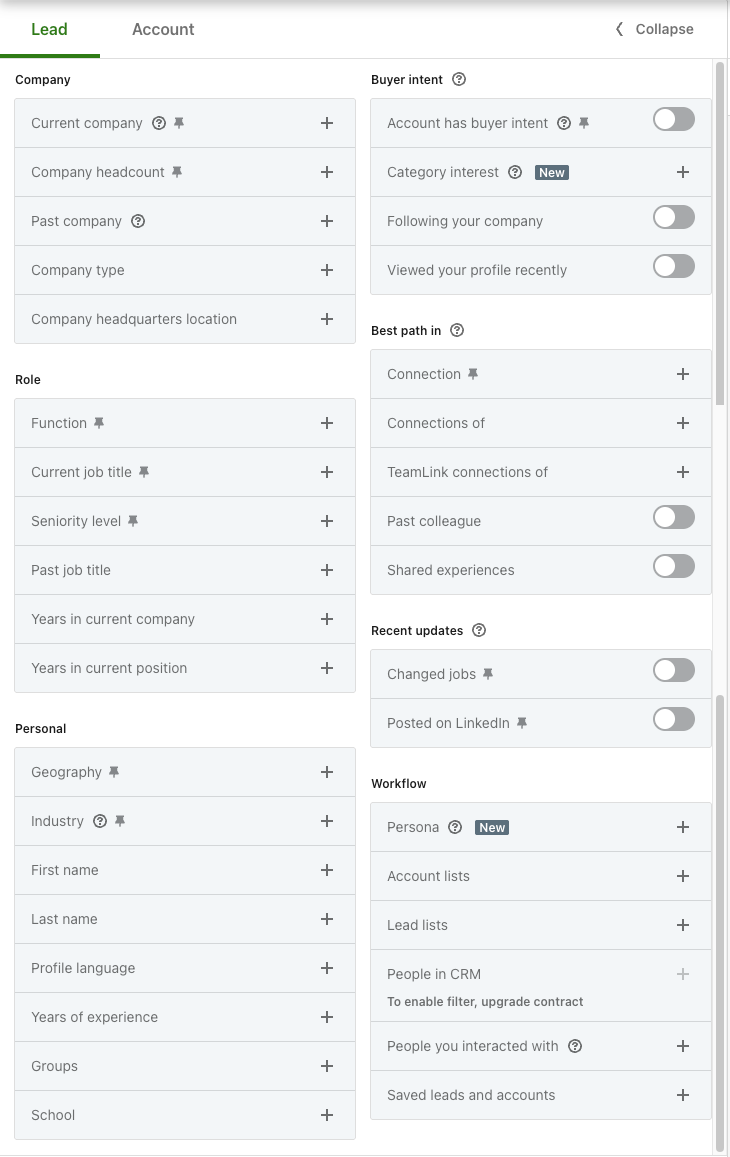
This level of granularity makes it much easier to zero in on exactly the type of people you want to reach.
Visibility of Shared Posts
When you post, your 1st-degree connections see it in their feed. If they interact, it extends to their own connections (your 2nd-degree), and if those people engage, it can spread further to the 3rd-degree network. This is how visibility compounds, leading to more followers, profile views, and connection requests.
The posts you see in your feed follow the same principle. They include updates from your 1st-degree connections, posts that they have interacted with, and sometimes extended network activity.
Post reach also depends on the visibility option you choose when publishing:
- Anyone: Visible to everyone on or off LinkedIn, including your extended network.
- Connections Only: Visible only to your 1st-degree connections.
- Group: Visible only within a specific LinkedIn group.
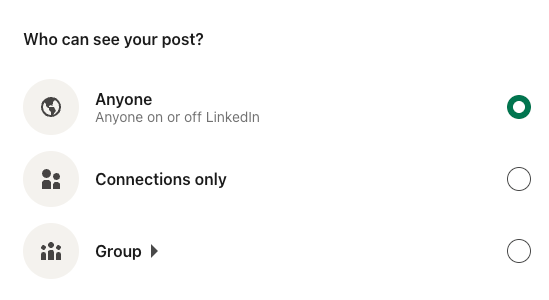
Once chosen, the setting becomes your default (though you can change it before publishing again). For scheduled posts, the visibility setting active at the time of creation will apply.
The 500+ Connections Mark
On LinkedIn, once you cross 500 connections, the platform stops displaying your exact number and simply shows “500+ connections.”
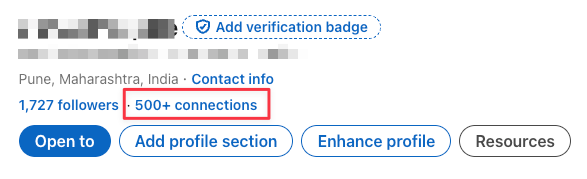
This becomes a signal that you’re a well-connected and active professional, which naturally boosts your credibility. People are more likely to accept your requests if they see you’re established on the platform.
Hitting the 500+ mark also comes with practical benefits:
- Better Visibility: LinkedIn’s algorithm starts showing your profile more often in search results.
- Wider Reach: Your posts and updates can reach more people, driving higher engagement.
- More Opportunities: With a larger, relevant network, you increase your chances of finding clients, collaborators, or job opportunities.
The Impact of Connecting Mindlessly
Many new users rush to hit 500+ by connecting with anyone and everyone they come across. But growing numbers without a strategy does more harm than good.
Every connection should serve a purpose and align with your goals. This often includes:
- Peers in your industry
- Thought leaders you want to learn from
- Your ideal clients, employers, or employees
- A handful of inspiring people from other fields
What doesn’t help is connecting blindly.
Imagine you’re a CFO looking for fractional opportunities. If you connect with 500 random people, say, LinkedIn trainers or fitness coaches, your feed fills with irrelevant content, and your own posts reach an audience unlikely to hire you.
But if you intentionally connect with 20 startup founders, suddenly your posts land directly in front of potential clients. Relevance matters far more than volume.
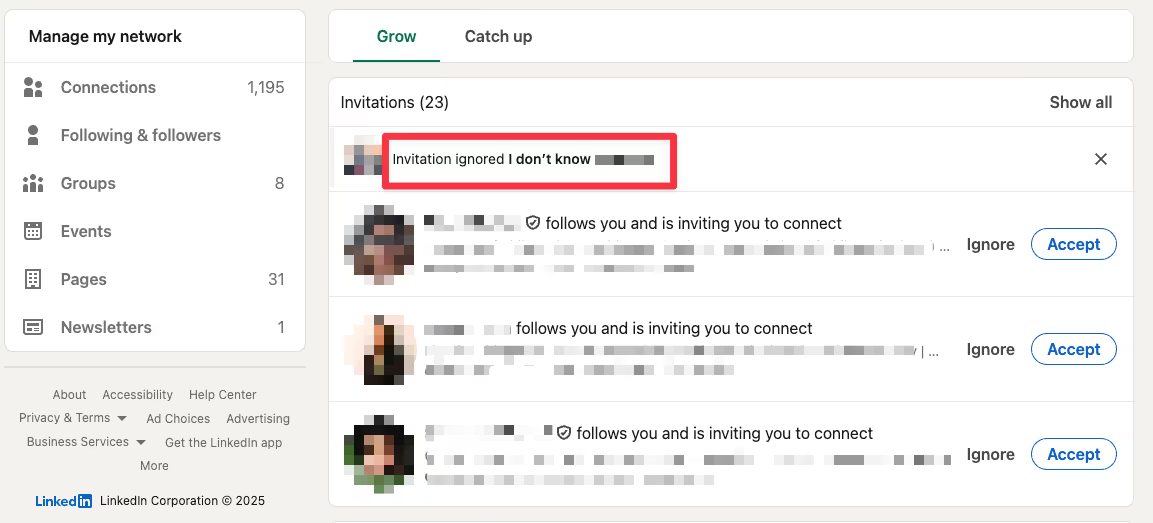
Rapid, mindless connecting can also raise red flags with LinkedIn’s system. If too many requests are ignored or marked as ‘I don’t know this person,’ your account risks restrictions or even suspension. Beyond ethics, this alone is a strong reason to be intentional with your connections.
100 Connections Per Week
LinkedIn limits connection requests to 100 per week to encourage more meaningful connections and reduce artificially inflated profiles.
Ideally, if you can connect with 10–15 people per day thoughtfully, you’ll make the most of what LinkedIn allows while still keeping your network relevant and valuable.
If you want to save your connection request limit, you can subscribe to any LinkedIn Premium plan. This gives you access to InMail messages (so you can reach people without connecting) and also lets you identify Open Profiles, which can be messaged directly.
You can message open profiles without Premium, but you’ll need to check manually by visiting each profile and looking for the InMail option.
How to Make Every Connection Valuable
If you’re going to send a connection request consciously, it’s best practice to make it worth it by personalizing the request and starting a conversation.
LinkedIn gives you the option to add a note with every request.
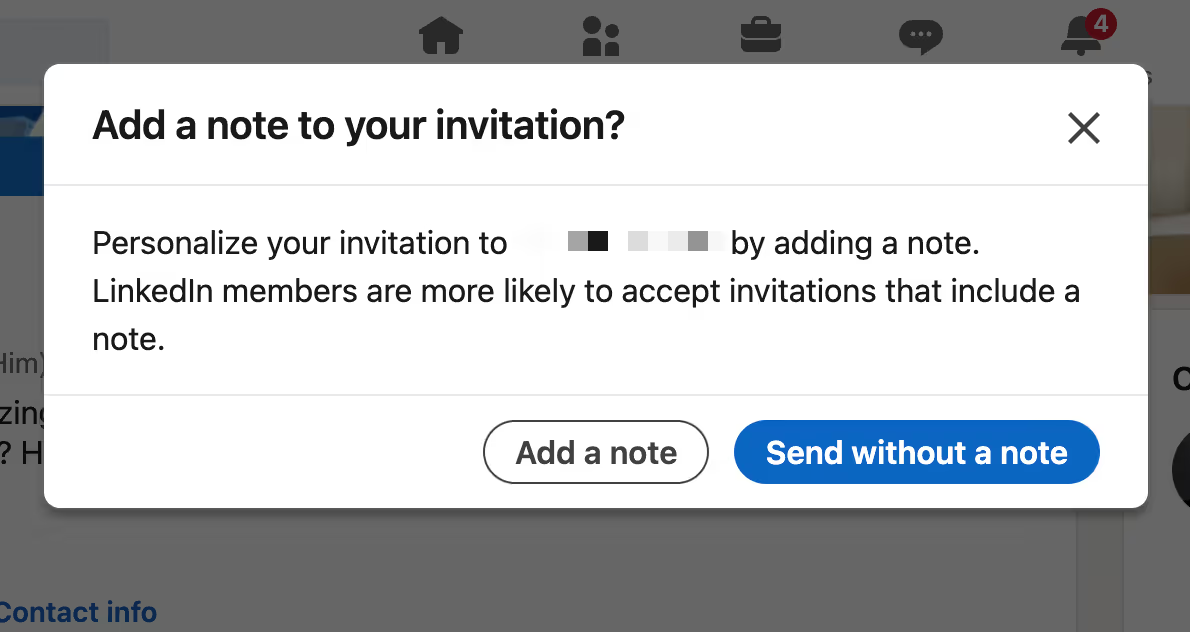
A good personalized note could be:
- Referring to where you’ve already met or interacted outside LinkedIn.
- Mentioning a back-and-forth you’ve had in the comments section and how connecting could deepen the conversation.
- Pointing out a challenge you’re facing and how you value their expertise or perspective.
What to avoid:
- Generic lines that add no significance.
- Directly pitching your service in the first message.
It’s better to send no note than to send a bad one. But if you want to increase your acceptance rate, personalization almost always helps.
When to Follow vs. When to Connect
You don’t need to connect with everyone you find interesting on LinkedIn.
If you simply want to learn from someone, get inspired by their posts, or stay updated on their insights, following is enough. This includes thought leaders and influencers
You connect when:
- You know the individual personally (colleague, classmate, acquaintance).
- You want to message them directly for a useful reason.
- You see potential for collaboration, recruitment, or hiring.
- You’re in the same industry/peer group and want to build mutual visibility.
- You share common goals, communities, or networks where staying in touch could add value.
- You’ve interacted meaningfully on LinkedIn (comments, discussions, DMs) and want to formalize the connection.
Follow for learning, connect for relationship-building.
The Role of Mutual Connections
When you want to turn a 2nd-degree connection into a first, that’s when your existing network matters most.
This only works if:
- Your 1st-degree connection knows you well enough to vouch for you.
- You’ve built enough rapport with them to ask for an introduction.
For example,
Hey [1st-degree’s name], I noticed you’re connected with [2nd-degree’s name]. I’ve been following their work in [specific area] and would love to connect with them to explore [specific reason — e.g., collaboration, advice, opportunity]. Would you be comfortable introducing us?
Or you can make it even lighter
Hey [1st-degree’s name], I see you know [2nd-degree’s name]. I’m planning to reach out. Would it be okay if I mention you as the connecting point?
Don’t make it transactional; always let your 1st-degree connection know why you want to connect, so they feel comfortable making the introduction.
Once you’re introduced, personalize your connection note right away and mention your mutual contact to create context. And remember, don’t overuse introductions; protect your goodwill with your 1st-degree connections by asking only when it’s genuinely valuable.
Connections vs. Followers: Which Matters More for You?
Like most elements of LinkedIn, the answer depends on the objective of your presence on the platform. If you’re trying to build thought leadership or position yourself as a LinkedIn creator, followers become more important. Reach, visibility, and audience size are your biggest levers, and followers help your content travel farther.
If you are seeking career opportunities or building professional credibility, connections matter more. They allow you to message people directly, nurture relationships, and build trust through conversation.
For business development, both go hand in hand: followers expand awareness while connections open the door to actual conversations, deals, and long-term relationships.
In general, if you want a strong executive presence on LinkedIn, you need a balance of both.
Followers help you go wide. Connections help you go deep.
Conclusion
Networking on LinkedIn is more layered than most other platforms, and that’s exactly what makes it so powerful for professionals. It may feel complex at first, but with time and the right guidance, you can build a network that genuinely supports your growth and opens the right doors.
At GrowedIn, we’ve experimented, learned, and worked closely with executive profiles to master how leaders can use LinkedIn to build real social capital. If you’d like to explore what that could look like for you, let’s talk.

Frequently Asked Questions
Do LinkedIn connection requests expire?
Yes. They expire after 6 months if they are not accepted.
Why can’t I see certain people’s names?
This usually means they’re outside your 3rd-degree network, or the person has chosen stricter privacy settings.
What happens if too many people ignore my requests?
LinkedIn may restrict your ability to send more connection requests until the issue improves.
Can I withdraw a LinkedIn connection request?
Yes. You can cancel any pending connection request at any time. The recipient of the request will not receive a notification; however, you won’t be able to send a new invitation to the same member for up to three weeks.
What’s the ideal size of a LinkedIn network?
Quality matters more than quantity, but reaching 500 connections plus signals credibility and active participation.
Can I remove LinkedIn connections without them knowing?
Yes. LinkedIn does not notify the person when you remove them.
Should I accept all requests I get?
No. Prioritize relevance, trust, and alignment with your professional goals.
Can I block or restrict someone on LinkedIn?
Yes. You can block and unblock profiles on LinkedIn without them being notified.
How LinkedIn Connections Work
- 1st-degree connections are people you’re directly connected to, whom you can freely message and interact with.
- 2nd-degree connections are connected to your connections, making them the easiest path to grow your network further.
- 3rd-degree connections sit at the edge of your network, harder to reach but still accessible with the right approach.
- Followers aren’t always connections, but they see your updates and help amplify your content reach.
- Open Profiles allow anyone to send messages without LinkedIn Premium, though you have to check manually which ones are open.
- Premium search filters let you go beyond basic degrees of connection by targeting seniority, function, company size, geography, and more.
- Sending too many random requests can harm your credibility, restrict your account, or even risk suspension. So quality connections matter more than volume.


Insights Hub
Employer Branding on LinkedIn
The Best Time To Post on LinkedIn In 2026