 Claude
 ChatGPT
 Gemini
Despite crowded inboxes, 80% of buyers still prefer to be contacted by email.
This makes LinkedIn, with its 1.2 billion registered professionals and 69 million companies, a goldmine for professional information, including email addresses.
The challenge is that these emails are not always easy to find, and not every method is ethical or appropriate.
In this article, we’ll show you how to ethically find email addresses through LinkedIn, starting with simple built-in methods and moving toward more advanced techniques that still respect privacy and professional boundaries.
The Basics of LinkedIn Contact Information
LinkedIn allows every user to control who can see their contact information, including email addresses, through its privacy settings.
Here’s how users can manage their visibility:
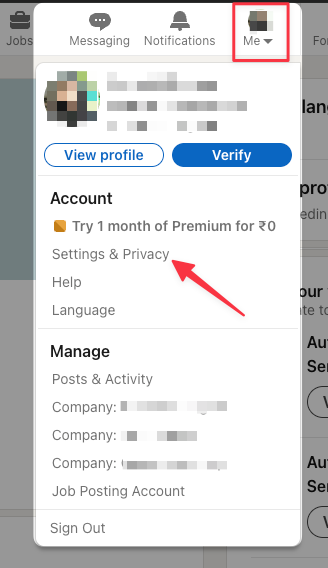
1. Click the Me icon on your LinkedIn homepage.
2. Select Settings & Privacy from the dropdown menu.
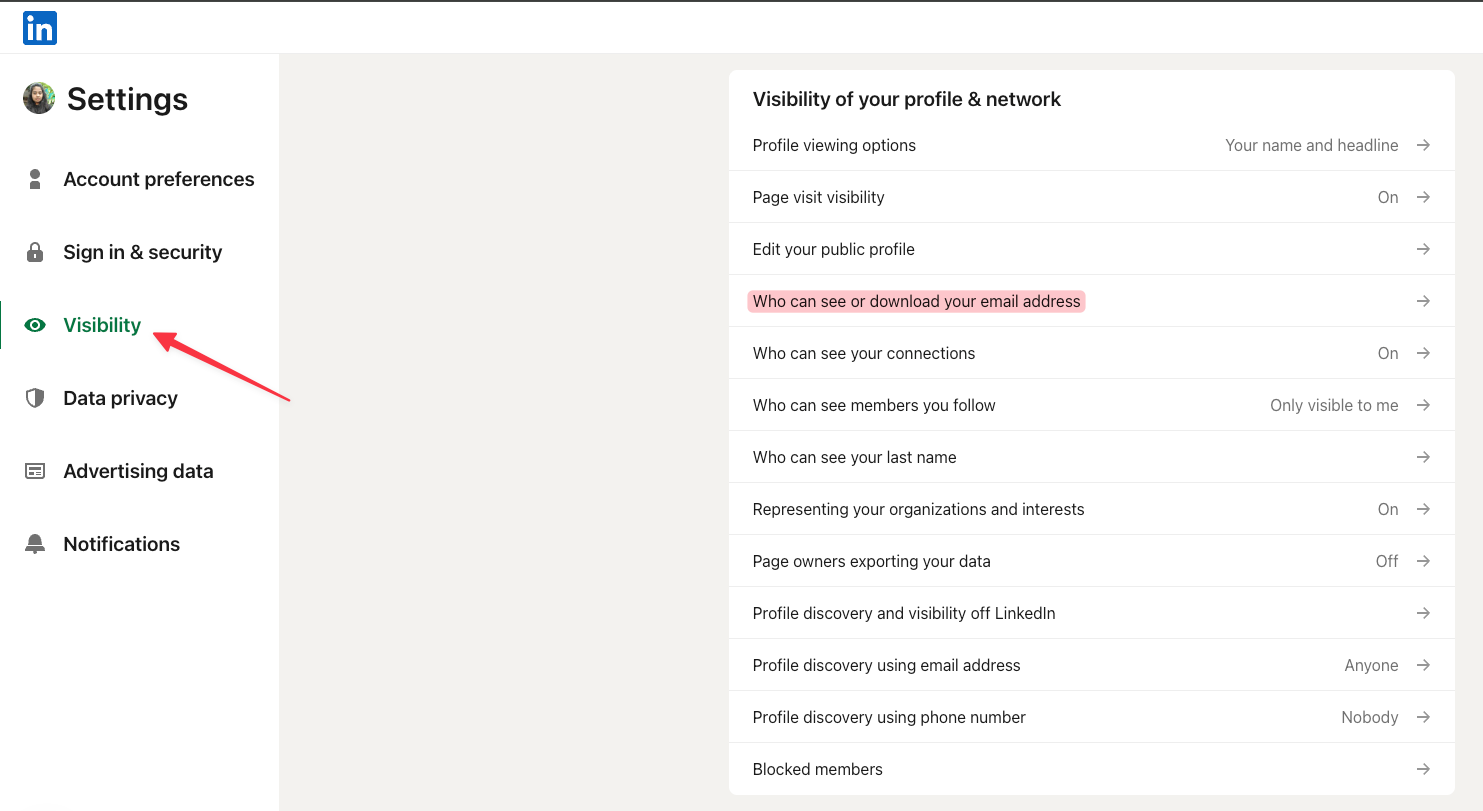
3. Navigate to the Visibility section to adjust who can access your contact information.
Once you understand how these controls work, it becomes clearer why some email addresses are visible and others are not.
Who Can See Your Email Address
You decide who can view your email on LinkedIn.
Your visibility options include:
- 1st-degree connections only
- 1st and 2nd-degree connections
- Anyone
- No one
To adjust this, go to Settings & Privacy → Visibility → Who can see or download your email address.
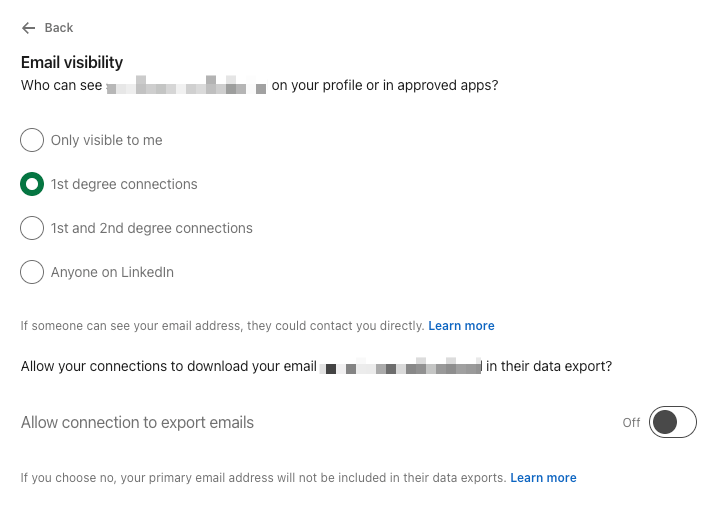
You can also control both profile visibility, deciding what information is shown publicly or in search engines, and profile viewing options, choosing to browse LinkedIn anonymously or with your identity visible.
Understanding LinkedIn Connections
Your LinkedIn network is made up of:
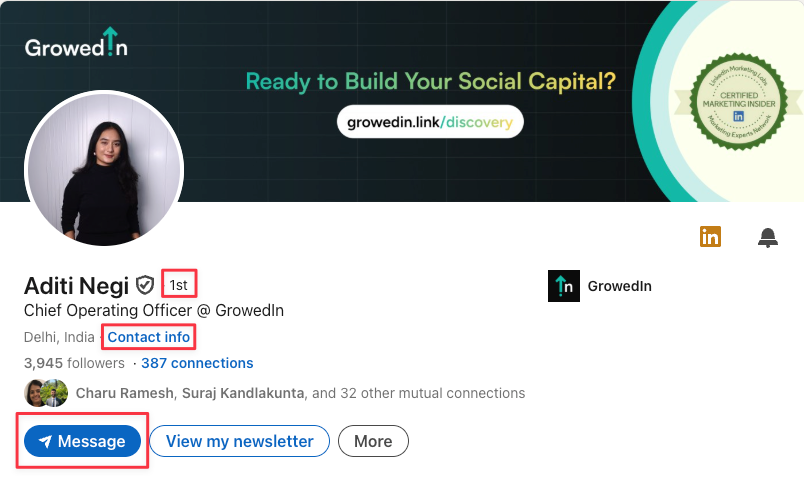
1st-Degree Connections
These are people you are directly connected to. You can message them, engage freely, and view full profile details, including their email if they have made it visible.
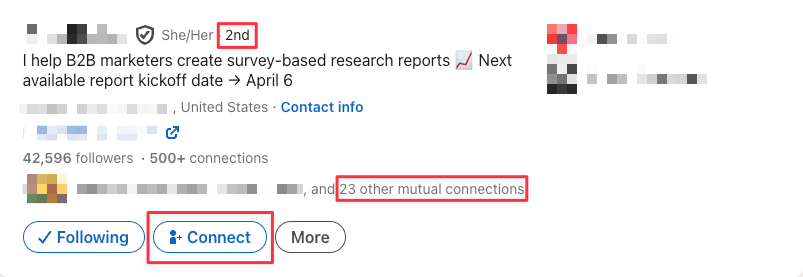
2nd-Degree Connections
These are people connected to your 1st-degree contacts. You can see limited profile information and send them connection requests.
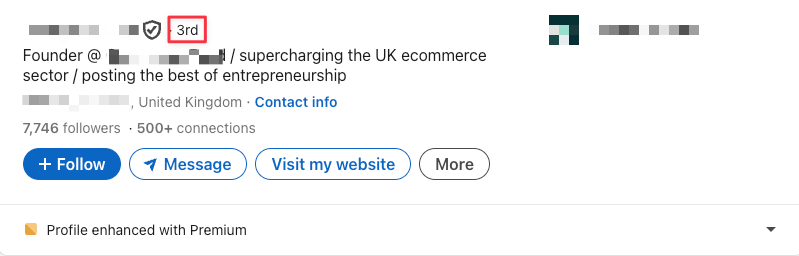
3rd-Degree Connections
These are connected to your 2nd-degree network. You will typically see only basic information, and contacting them may require an introduction, a connection request, or InMail through LinkedIn Premium.
LinkedIn’s Data Collection Rules
1. Exporting Contact Data
You can export your LinkedIn contacts, but you can only get emails from your 1st-degree connections who’ve agreed to share them. Misusing this data for unsolicited outreach or spam can get your account restricted.
2. Compliance with Privacy Regulations
LinkedIn follows major global privacy laws like GDPR and CCPA, which require personal data like emails to be collected legally and transparently. Unauthorized scraping or outreach without consent can violate both LinkedIn’s policies and privacy laws.
3. Restrictions on Data Scraping
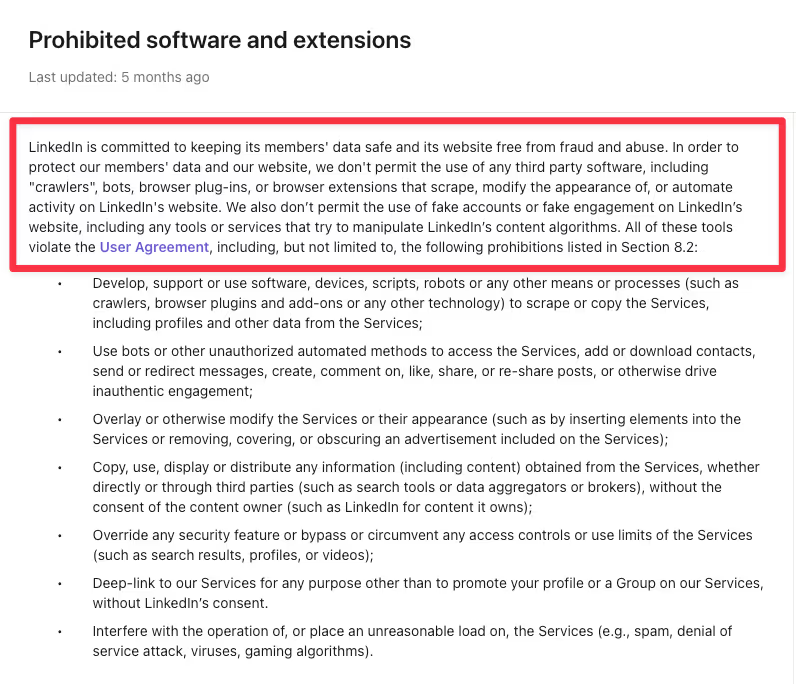
LinkedIn’s Terms of Service prohibit using bots, automation tools, or unauthorized scrapers to collect data from the platform.
Now that you understand how contact information is displayed, the privacy controls, and LinkedIn’s stance on data collection, let’s look at the different ways to find email addresses.
Method 1: Finding Emails Manually
Check the Contact Info Section
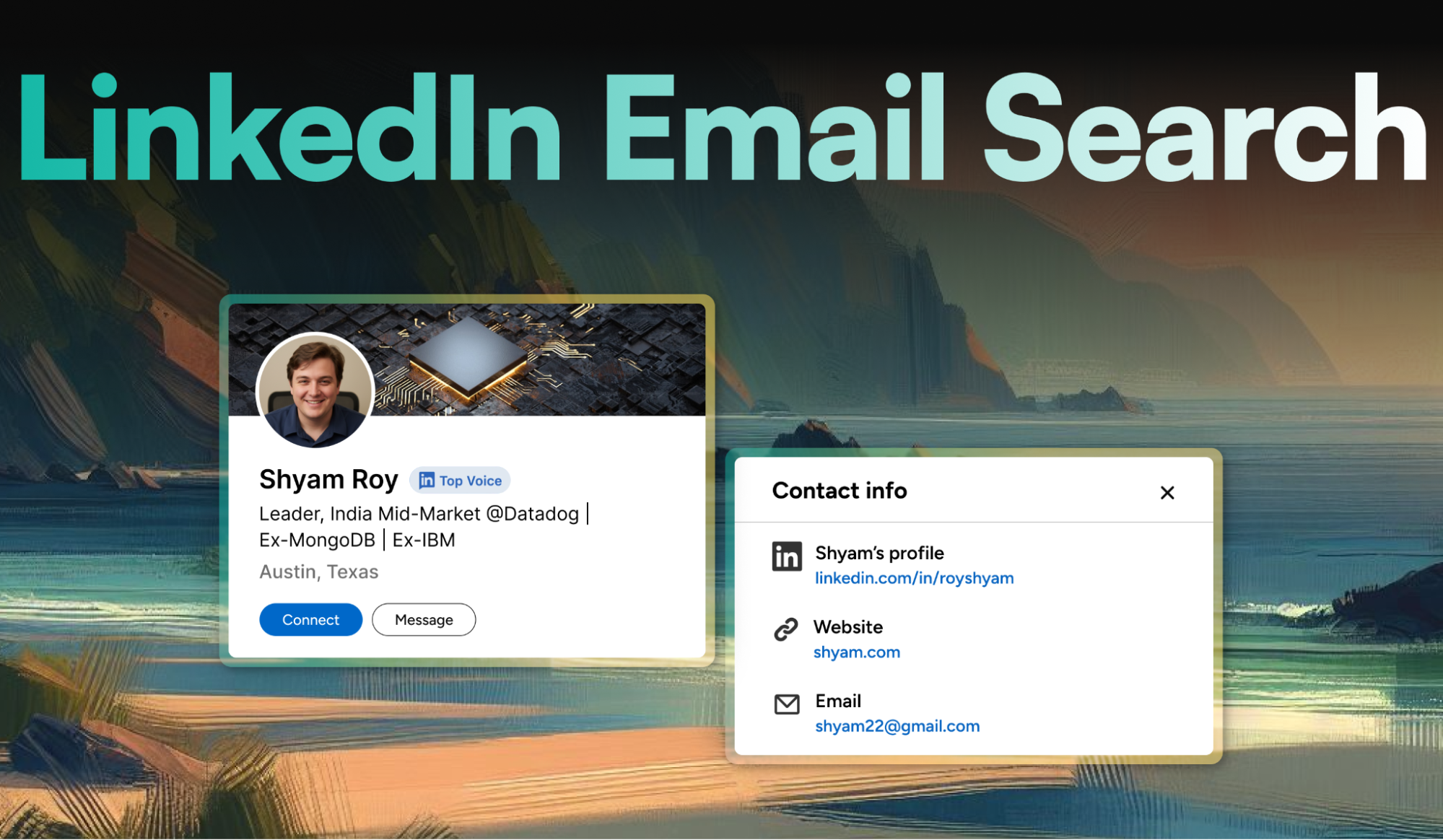
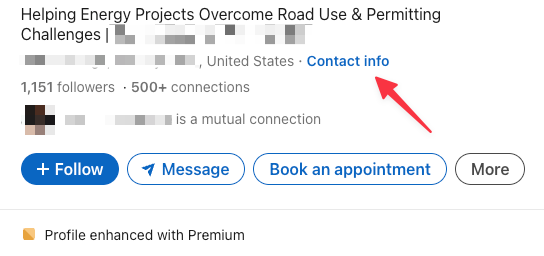
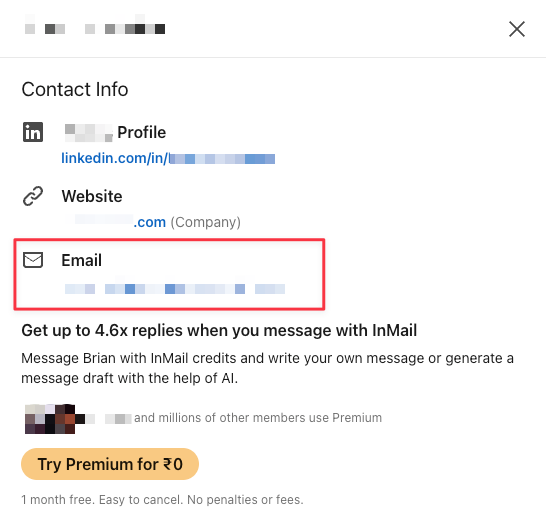
Start by visiting the Contact Info section on a user’s profile. Many professionals list their email addresses here, especially if they are open to business inquiries, partnerships, or networking.
Keep in mind, emails are only visible if the person has chosen to make them public in their privacy settings.
Using Boolean Strings
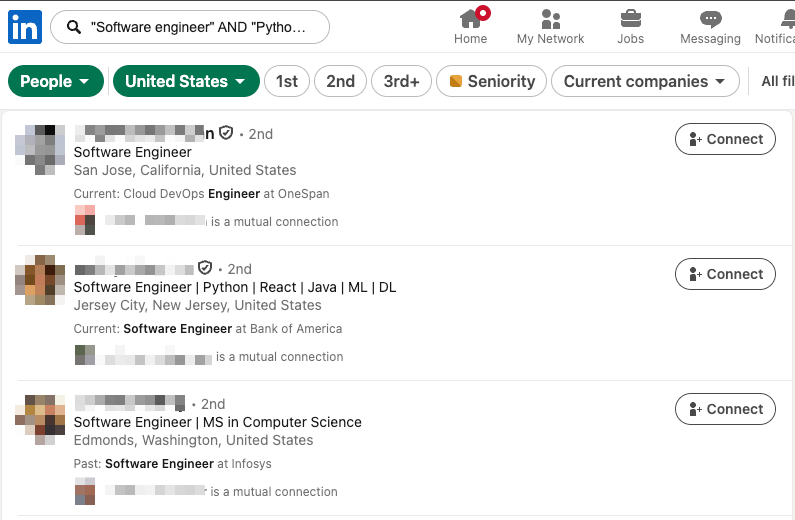
You can use Boolean search inside the LinkedIn search bar to find highly specific profiles. Boolean operators such as AND, OR, and NOT help you narrow or expand your results.
For example, to find a software engineer skilled in Python but exclude interns, type:
"Software engineer" AND "Python" NOT "Intern."
This shows only software engineers with Python expertise while excluding intern profiles.
Once you identify the right profiles, make note of the companies they work for. This gives you the company domain (such as @company.com), which you can later use to deduce their email format.
Combine LinkedIn and Google
A powerful tactic is to combine LinkedIn’s accuracy with Google’s search depth.
- Use LinkedIn to find relevant profiles and identify their company domains.
- Use Google Boolean searches to verify information and uncover additional signals (such as public directories, press releases, or author pages).
This two-step approach is often faster and more accurate than relying on either platform alone.
Deduce Email Patterns
Most companies follow standard, predictable email structures. Once you know the individual’s name and the company domain, you can try common formats such as:
- firstname.lastname@company.com
- firstinitiallastname@company.com
- firstname@company.com
- firstname_lastname@company.com
This method is simple, widely used, and usually effective when the company has a consistent email pattern.
Method 2: Use LinkedIn’s Built-in Features
Send a personalized connection request (and politely ask for their email).
You can add a short note of up to 200 characters for up to 3 connection requests per month. With a LinkedIn Premium membership, you can add personalized notes to all your connection requests you send.
Why this works
A relevant, value-led note gives context and makes it easy for the person to accept your request and to share the best email for follow-up.
Let’s see how we can approach this step by step:
1. Decide who you want to connect with
Use LinkedIn’s search filters (industry, location, role) and Boolean search to refine results.
2. Send Personalized Connection Requests
Click Connect → Add a note.
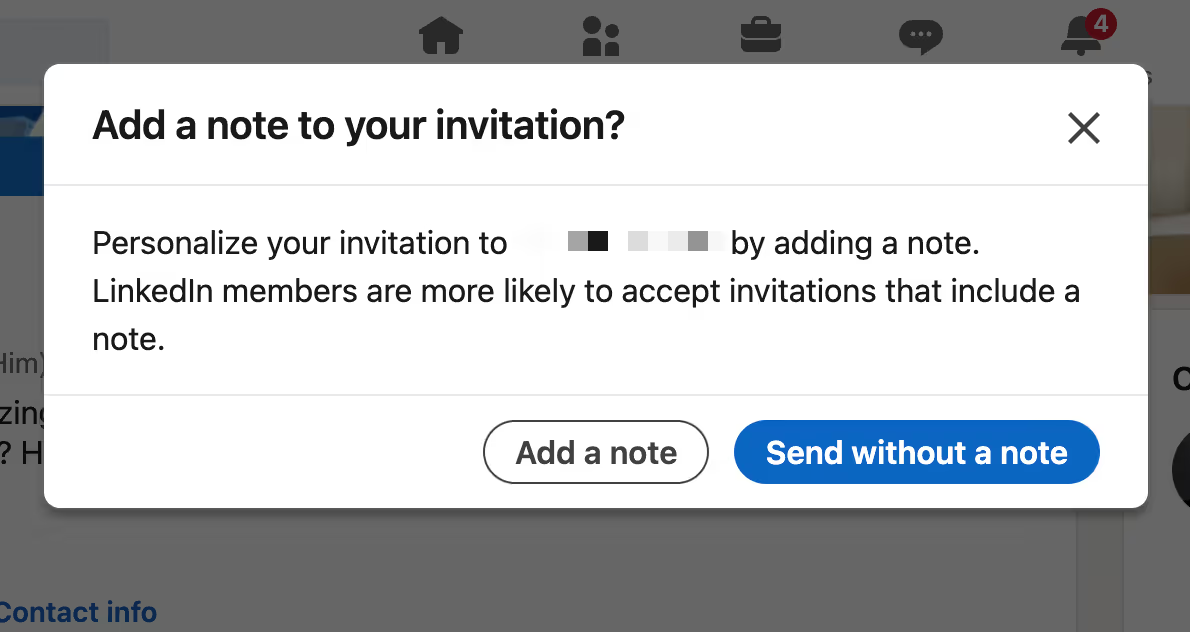
Always write a short, personalized message highlighting a shared interest or reason for connecting. Outreach that feels personal and relevant increases your acceptance rate.
You can ask for their email directly in the note, or wait until after they accept to avoid sounding pushy.
Examples:
Variation 1:
“Hi [Name], I noticed we share an interest in [topic]. I’ve been following [industry/company] and was impressed by your work at [company]. Would love to connect and exchange thoughts.”
Follow-up after acceptance:
“Thanks for connecting, [Name]! I’d love to discuss [topic/idea] in more detail. If you’re comfortable, could you share your email so we can continue the conversation there?”
Variation 2:
“Hi [Name], I’m exploring opportunities to work with [company] and noticed your expertise in [field]. Could you share your email so we can discuss a few ideas in detail?”
Tips for better requests:
- Never send a blank request.
- Keep your messages short and clear.
- Don’t sound pushy, focus on building value first.
Exporting First-Degree Connections to CSV
A handy but lesser-known trick is exporting your 1st-degree connections (along with any contact details they’ve shared) into a CSV file.
CSV files are great for importing bulk data into CRMs like HubSpot in a clean, structured format.
Once exported, you can send personalized emails at scale, track responses, and manage follow-ups more efficiently.
Here’s a step-by-step guide to exporting 1st-degree connections to a CSV file:
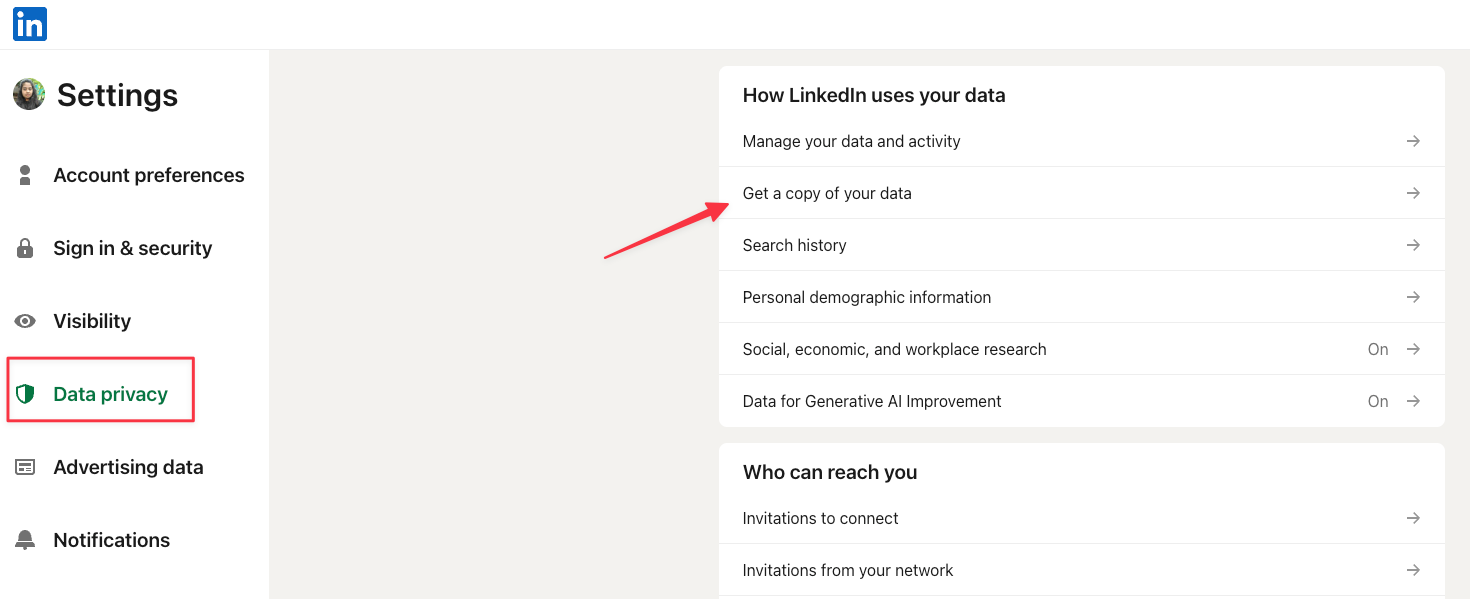
1. Click the Me icon at the top of the LinkedIn homepage and choose Settings and Privacy from the dropdown menu.
2. In the left-hand menu, go to Data Privacy. Under the section titled How LinkedIn uses your data, select Get a copy of your data.
3. Choose “Download larger data archive, including connections, verifications, contacts, account history, and information we infer about you based on your profile and activity.”
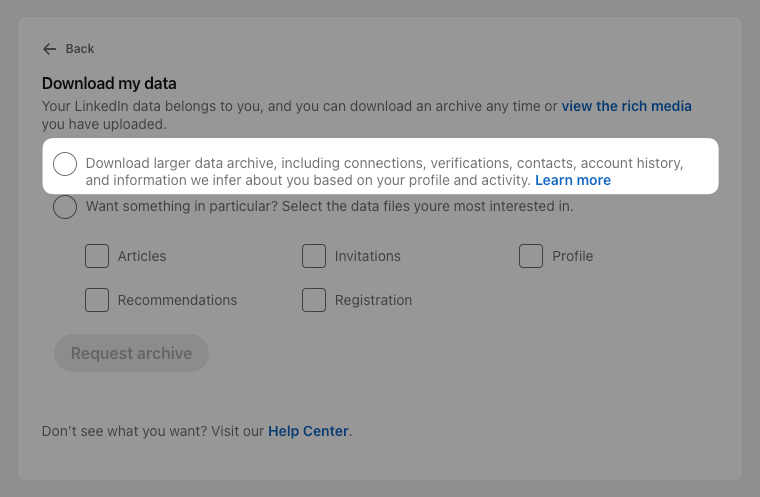
4. Click Request archive to begin the download process.
5. LinkedIn will send a message to your primary email address with a link to access your downloadable file.
Special Features in Sales Navigator
If you work in B2B sales, Sales Navigator is one of the most effective premium tools for finding, engaging, and nurturing high-quality leads. It gives you far more control than standard LinkedIn search and is designed specifically for outbound and account-based strategies.
It offers:
- Advanced Search Filters: Drill down with 30+ filters (job function, seniority, geography, industry, etc.) to find decision makers who match your ICP instead of casting a wide net.
- Lead Recommendations: Get AI-powered suggestions based on your past searches, saved lists, and engagement patterns. This keeps your pipeline fresh without extra manual effort.
- InMail Messaging: Reach prospects outside your network. You can politely request their preferred email if not visible, but avoid spamming.
- Smart Links: Share content as trackable links and see exactly how prospects engage with it; perfect for warming up leads before direct outreach.
- CRM Integration: Export leads and data directly to CRMs like Salesforce or HubSpot for easier management.
Method 3: Using Email Finder Tools and Chrome Extensions
Manually extracting emails from LinkedIn is slow, inconsistent, and nearly impossible to scale as your outreach grows. It can lead to missed opportunities, delayed follow-ups, and inaccurate data.
Email finder tools and Chrome extensions solve this problem by automating the process. They help you identify email addresses quickly, verify them, and build lead lists without the manual workload.
Below are some of the most popular options, along with their strengths, limitations, and pricing.
Popular Email Finder Tools
1. Kaspr
Pros:
- Real-time data collection via Chrome extension
- Large B2B database (500M+ emails and phone numbers)
- Fully GDPR compliant
Cons:
- Concerns about limited credits and inefficient verification
Pricing: Paid plans start from $53.24/month
2. Wiza
Pros:
- Converts LinkedIn searches into email lists instantly
- Bulk email verification supported
Cons:
- The free plan is restrictive
Pricing: Paid plans start from $83/month
3. UpLead
Pros:
- Claims 95% accuracy on verified emails
- 50+ search filters for precise targeting
Cons:
- Users often struggle with outdated data or missing contacts
Pricing: Paid plans start from $99/month
4. Skrapp.io
Pros:
- Simple interface, supports bulk extraction
- Claims 90% accurate email verification
Cons:
- Free plan has limited searches
- Reports of missing information and inaccurate employee data
Pricing: Paid plans start from $30/month
5. AeroLeads
Pros:
- Bulk searches and CRM integrations available
- Ease of use
- Cost-effective
Cons:
- Limited credits
Pricing: Paid plans start from $49/month
6. Hunter.io
Pros:
- Excellent email verification
- Very user-friendly
Cons:
- Limited credits and features
Pricing: Paid plans start from $34/month
*Prices mentioned are indicative and may vary by region or change over time. Please refer to official websites for the latest pricing and feature updates.
Major B2B Email Databases
If you’re looking for large-scale B2B email databases, here are some of the top options:
1. ZoomInfo: A massive database with millions of contacts and company profiles.
2. LinkedIn Sales Navigator: Great for finding leads within LinkedIn’s network, with advanced search filters.
3. Clearbit by HubSpot: Enriches your CRM with detailed company and contact insights.
4. Cognism: Known for global coverage, strong accuracy, and compliance focus.
Most of these platforms integrate directly with CRMs like Salesforce or HubSpot, so you can push contacts straight into your workflows.
Now, how accurate are they? It depends.
Regular updates and user feedback help maintain quality, but tools with real-time verification (like Hunter.io) tend to deliver the most reliable results.
Using Email Finder Tools Responsibly
While email-finding tools can supercharge your outreach, it’s crucial to stay compliant with privacy laws like GDPR and CCPA.
1. Get Consent: Always ensure you have permission to contact someone. Be transparent about how you obtained their information and why you are reaching out.
2. Protect Data: Store any collected contact data securely. Limit access, avoid unnecessary downloads, and make sure your systems follow proper security practices.
3. Offer an Opt-Out: Every outreach email should include an easy way to unsubscribe. This keeps you compliant and shows respect for the recipient’s preferences.
Keeping It Professional and Avoiding Spam
No one wants to be seen as the person who spams inboxes. Here is how to keep your outreach professional, respectful, and effective.
Steer Clear of Spammy Tactics: According to a Gartner report, 67% of B2B buyers and consumers create junk email accounts just to dodge unwanted emails. So, to keep your emails out of the trash, make sure they're super relevant and well-targeted.
Quality Beats Quantity: Focus on sending well-thought-out, targeted emails rather than blasting your entire list. This approach not only gets better engagement but also keeps your sender's reputation intact.
Be Transparent: Let people know exactly how their data will be used, and always offer an easy opt-out option.
Verify Emails Before Sending
Once you have a list of potential email formats, it’s crucial to make sure they’re real and deliverable. Even the best outreach won’t work if your emails never reach the prospect’s inbox.
Here’s why you should always verify emails:
- Lower Bounce Rates: Invalid emails lead to high bounce rates, which can damage your sender reputation and increase the likelihood of your emails being flagged as spam.
- Better Engagement: Verified emails land in real inboxes, improving open and response rates.
- Protect Your Sender Reputation: A clean, verified list keeps your domain healthy so that future campaigns continue to reach the inbox successfully.
Taking a few minutes to verify emails can save hours of wasted outreach and help you maintain credibility.
How to Verify Emails
Use email verification tools like Hunter.io, NeverBounce, or ZeroBounce to check if your emails are valid and deliverable.
For large lists, bulk verification is a lifesaver. Tools like NeverBounce, ZeroBounce, DeBounce, and Hunter.io allow you to upload entire lists and clean them at scale far more efficiently than manual checks.
Tips to Make Sure Your Emails Are Delivered (and Read!)
1. Warm Up Your Email Account
If you’re using a new domain or sending high volumes, start slow (e.g., 10–20 emails daily) and gradually increase by 10–20% daily. The slow ramp-up helps build trust with email providers and reduces the chance of being marked as spam.
2. Write Killer Outreach Messages
Generic emails get ignored. Personalization can boost open rates by 29% and click-through rates by 41%. True personalization goes beyond just inserting a first name; focus on writing messages that reflect the recipient’s context, role, or recent work.
3. Use Smart Templates
Templates help you move fast without sounding robotic. Use them as a base, but customize each message so it feels like it was written specifically for the recipient.
Template 1: Hi [Name], I came across your profile on LinkedIn and really liked your perspective on [specific topic/post]. I’ve been exploring similar ideas around [related area] and thought it’d be great to connect and exchange insights.
Template 2: Hi [Name], I found your profile on LinkedIn while researching [industry/role], and your work at [company] stood out. I’d love to connect and learn more about your approach to [specific area].
Template 3: Hi [Name], I noticed we’re both connected with [mutual connection] on LinkedIn and share an interest in [topic]. I’ve been meaning to expand my network in this space; would be great to connect and hear your thoughts.
Pro Tips for Effective Email Outreach
Avoid Spam Triggers
Words like “Don’t delete,” “Click here,” “Cheap,” “Offer,” “Satisfaction guaranteed,” “Get rich,” and “Deal” can trigger spam filters and send your emails straight to junk folders.
Watch Your Metrics
Monitor open rates, click-through rates, and bounce rates. These signals help you refine your approach, improve timing, and adjust messaging based on what works best.
Follow Up
Many prospects don’t respond to the first email. Send a follow-up within 1–3 days, then additional reminders every 3–7 days if needed. Limit to 3–5 follow-ups to stay respectful.
Automate Follow-Ups
Automating follow-ups saves time and keeps conversations active. Email tools like Mailchimp can trigger sequences based on user actions.
Lead Scoring
Not every lead has the same buying intent. Lead scoring helps you prioritize the contacts most likely to convert, improving both efficiency and long-term results.
Conclusion
Finding professional emails has become much easier with LinkedIn, Chrome extensions, and modern email tools. But the real advantage comes from quality, not volume. Take the time to research your prospects, use targeted searches, and personalize your outreach. Stay polite, stay professional, and focus on building relationships with the right people instead of chasing a long list of contacts.
GrowedIn specializes in turning executive LinkedIn profiles into social capital engines. We’ve spent years mastering the platform, so you don’t have to. Schedule a call to discuss how we can build your LinkedIn brand together.

Frequently Asked Questions
How do I legally and ethically find emails using LinkedIn?
The safest methods involve using the Contact Info section, sending personalized connection requests, or using ethical tools that respect privacy settings. Avoid unauthorized scraping or automated data extraction activities that violate LinkedIn policies and global privacy laws.
Why can’t I see someone’s email even if we are connected?
Email visibility depends entirely on the user’s privacy settings. Even 1st-degree connections may choose to hide their email. In that case, you can request it politely through a personalized message or use verified business email tools.
Is exporting connection data from LinkedIn allowed?
Yes, exporting your 1st-degree connections is permitted, but you will only receive emails from people who have shared them.
Are email finder tools safe to use?
They are safe as long as they comply with GDPR, CCPA, and LinkedIn’s Terms of Service. Use them responsibly, verify emails before sending, and always provide an opt-out to avoid spam issues and protect your sender reputation.
What is the best way to increase replies to outreach emails?
Focus on personalization, relevance, and brevity. A warm intro referencing the person’s work, role, or recent activity increases engagement. Verified emails, clean lists, and respectful follow-ups also improve your chances of getting a positive response.
How to Find Professional Emails Using LinkedIn?
- LinkedIn is a powerful source for finding professional emails, but privacy settings determine what information you can see.
- Users control who can view their email, and profile visibility depends on 1st, 2nd, or 3rd-degree connection levels.
- Ethical email finding starts with manual methods, such as checking the Contact Info section and using Boolean searches.
- Combining LinkedIn searches with Google Boolean queries and company email patterns helps uncover accurate addresses.
- Personalized LinkedIn connection requests are an effective way to request emails directly and build relationships.
- Email finder tools and Chrome extensions automate the process, but must be used responsibly and in compliance with privacy laws.
- Verifying emails through tools like Hunter.io reduces bounce rates and protects sender reputation.
- Deliverability improves with warmed-up domains, personalized outreach, smart templates, respectful follow-ups, and avoidance of spam triggers.


Insights Hub
Employer Branding on LinkedIn

The Best Time To Post on LinkedIn In 2026