Most people start networking on LinkedIn only when they need something, whether that is a job, a client, a referral, or an introduction.
By that point, they are already late.
The strongest professionals on LinkedIn are not simply collecting connections. They are building visibility, trust, familiarity, and relevance over time. That is what creates opportunities, referrals, introductions, partnerships, and conversations that would otherwise never happen.
As one of the most valuable professional ecosystems online, LinkedIn is where founders, operators, executives, creators, recruiters, consultants, and specialists actively build relationships in public.
This guide will show you exactly how to build a high-value LinkedIn network in 2026, from sending personalized connection requests to getting the most out of Sales Navigator.
Why Should You Network on LinkedIn?
When you talk about "networking", what exactly is it that you refer to?
Is it simply increasing your follower count? Is it collecting the names of senior professionals so you can reach out when you need a favor? Or is it a one-sided attempt to gain information, recognition, or opportunities?
There are definitely benefits of networking on LinkedIn, like getting endorsed for your skill set, winning life-changing recommendations from leaders, and having a smooth lead generation cycle. However, networking in its truest sense is a genuine connection that two people establish over time for reasons greater than self-fulfillment.
On LinkedIn, your identity is defined by your work. Your role, your experience, and the value you bring to the table. Unlike other social platforms that emphasize lifestyle and optics, LinkedIn rewards substance: what you know, what you’ve built, and how you think. It’s a space where professionals can articulate their perspective, showcase their achievements, and engage with peers in a more meaningful way. As a result, the platform naturally leans toward collaboration and knowledge-sharing over surface-level competition.
The network you seek here will also consist of professionally driven, entrepreneurial individuals like you, who are passionate about personal growth and believe in community growth through meaningful relationships and the exchange of ideas.
In addition, LinkedIn’s advanced search, recommendation systems, Sales Navigator filters, and AI-powered features make it easier to discover relevant people, identify common ground, and build more targeted professional relationships than on most other platforms.
How to Network On LinkedIn: Top 6 Ways
1. Personalized Connection Requests
One of the first networking features you encounter on LinkedIn is the “Connect” button. This is the gateway to getting to know another person. Before sending a connection request, LinkedIn already gives you access to valuable context about a person, depending on their visibility settings. You can usually view their headline, About section, experience, recent activity, mutual connections, and recent posts.
Access to this information means that you can thoroughly analyze who to reach out to if you wish to expand your network in a deliberate manner.
The easiest way to catch someone’s attention on LinkedIn is to send them a connection request.
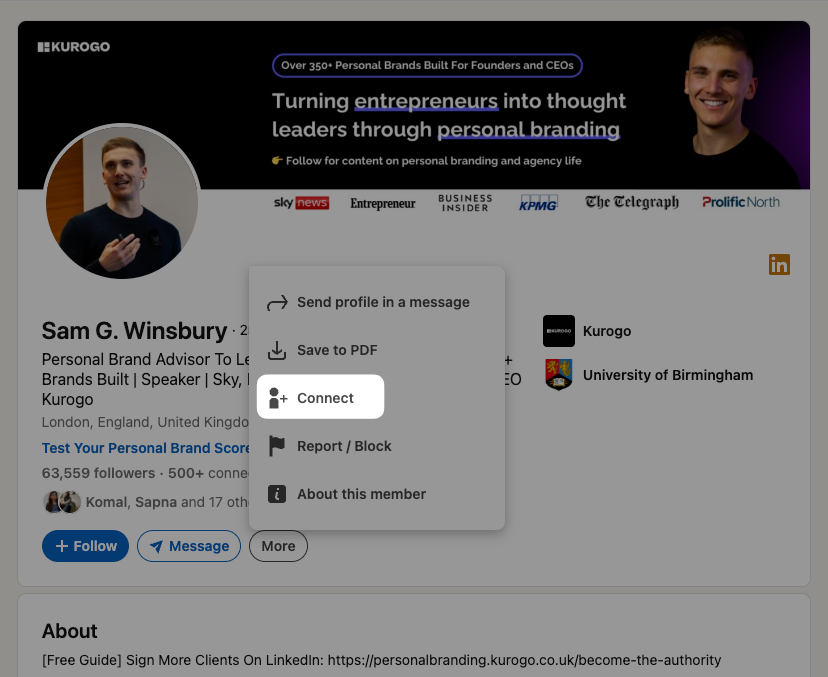
A connection request is a polite proposal to be part of someone’s network and, in turn, to have them over as part of yours. A connection is a two-way follow; now, you can not only view each other’s posts on the main feed, but also talk to each other via the DMs, leave each other recommendations, endorse each other, and further explore their 1st-degree connections. A connection request is like the first handshake toward nurturing a future relationship.
Now, when you’re extending a hand of friendship, you need to be offering something valuable that the recipient can gain from. Otherwise, there must be a specific purpose behind your connection request. Only then will any high-value profile agree to connect with you. This does not necessarily mean a future deal or a financial benefit. It can mean an ear to listen to their experiences, a humble request for guidance, or even gratitude for their business model.
That is why, in your connection request, you must always leave a note, as LinkedIn’s suggestive pop-up shows. Add in context; sending across a blank one might seem like a rude demand.
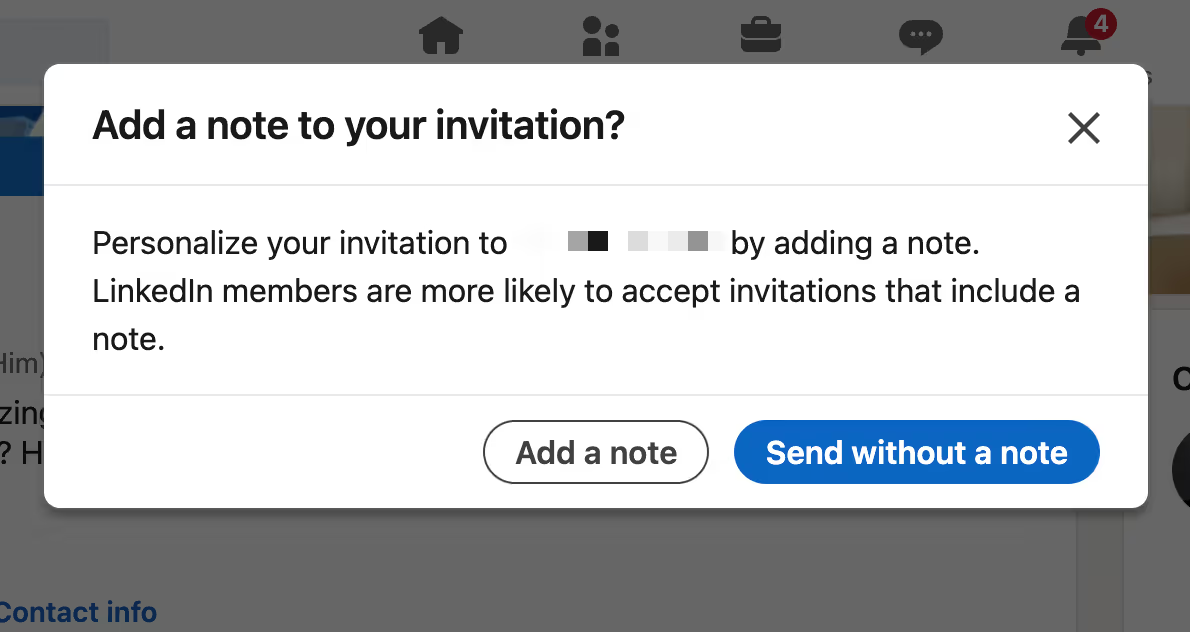
Here’s how you can personalize your connection request note:
- Start with how you heard about them. When you make them the center of focus, their interest in your message is piqued, and you secure their attention for the next half a minute.
- Inform them about the medium through which you discovered them and their work. You could have heard about them through a mutual contact or connection. You might have been drawn towards their business thanks to a webinar you attended. You might have read their newly launched book. You can even congratulate them on their startup’s funding round.
- Mention the intent with which you reach out. It can be admiration, conversation, or simply relatability. You can even authentically inform them about future business possibilities that you look forward to with them.
- Always end with a call to action. Let them know if they can send you an email or a reply with a LinkedIn message. Otherwise, you can end with a simple indication that you would love to hear back from them.
Let’s take a look at a successful connection request note:

The above message does everything right. It began with the recipient’s name, not missing the chance to grab his attention. Then, the sender introduces the context that drew them towards Keyur’s profile, most probably from a recent post. They also ended it with a CTA, requesting Keyur to connect back. Thus begins a conversation between leaders. As is evident, Keyur extends an invitation to meet off the platform.
However, there are certain social constructs that you must adhere to while sending a connection request to avoid repelling the recipient.
The worst notes force complicated thought spirals. Complex questions, interrogative suggestions, and news-related opinions are a no-go. Your note must be welcoming and positive, not intimidating and repelling.
Once accepted, your connection request note turns into a DM message, and voilà, you found your way into their network.
2. Consistent Mindful Engagement
One of the most effective ways to build meaningful connections on LinkedIn is to stay consistently active throughout the year, not just when you need something.
Thoughtful engagement helps you become familiar to people before you ever send a connection request or direct message. Over time, regular visibility builds recognition, credibility, and trust.
This does not mean commenting for the sake of activity. The goal is to engage meaningfully with posts, discussions, and ideas that genuinely align with your interests or expertise.
For example, you can:
- Leave thoughtful comments on posts from industry peers or leaders.
- Congratulate professionals on milestones, promotions, launches, or achievements.
- Add perspective to ongoing discussions instead of posting generic praise.
- Support creators, founders, or companies whose work you genuinely value.
Consistent engagement signals that you are paying attention to the industry and contributing to conversations rather than simply promoting yourself.
It also creates natural networking opportunities. Many professional relationships on LinkedIn begin through repeated interactions in comment sections long before a direct conversation happens. In some cases, engaging thoughtfully with one person’s content can also help you become visible to other professionals participating in the discussion, including founders, recruiters, executives, and decision-makers within the same network.
The key is to focus on quality over volume. A few relevant and thoughtful interactions each week are usually far more valuable than dozens of generic comments posted purely for visibility.
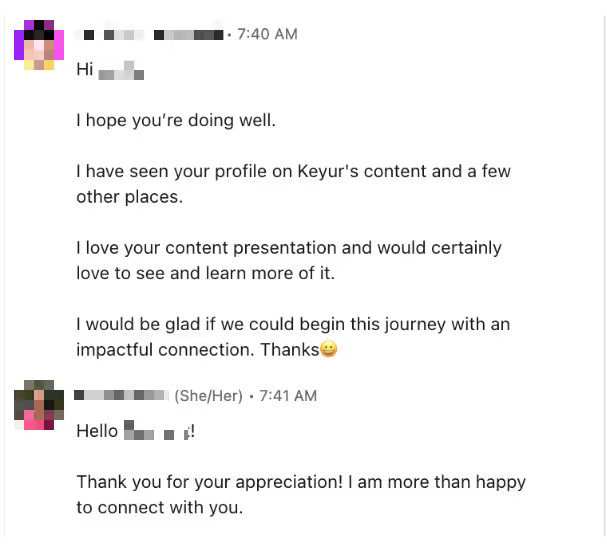
For example, look at the above connection request sent by someone who found the creator through another LinkedIn user’s comment section. The intent is declared, the source of information is conveyed, and a mutual contact is referred to. All these factors add up to enough incentive for the recipient of the connection request to reciprocate.
Over time, such organic engagement can bring you leads if you are looking for hiring or marketing growth, too.
3. See Who Viewed Your LinkedIn Profile (and Turn It Into a Conversation)
One of the more useful networking features available with LinkedIn Premium is the ability to see who has viewed your profile. While many people treat this as a passive metric, it can actually become a strong relationship-building opportunity when approached thoughtfully.
Profile views often signal curiosity or professional relevance. Someone may have discovered you through a post, a comment section, a mutual connection, a search result, or shared industry discussions. In many cases, they were interested enough to spend time learning more about your background and work.
That creates a warmer starting point than completely cold outreach.
When you notice relevant professionals viewing your profile, you can evaluate whether the connection makes sense and then reach out with context. Since the person has already seen your profile, your name may feel more familiar when your connection request appears in their inbox.
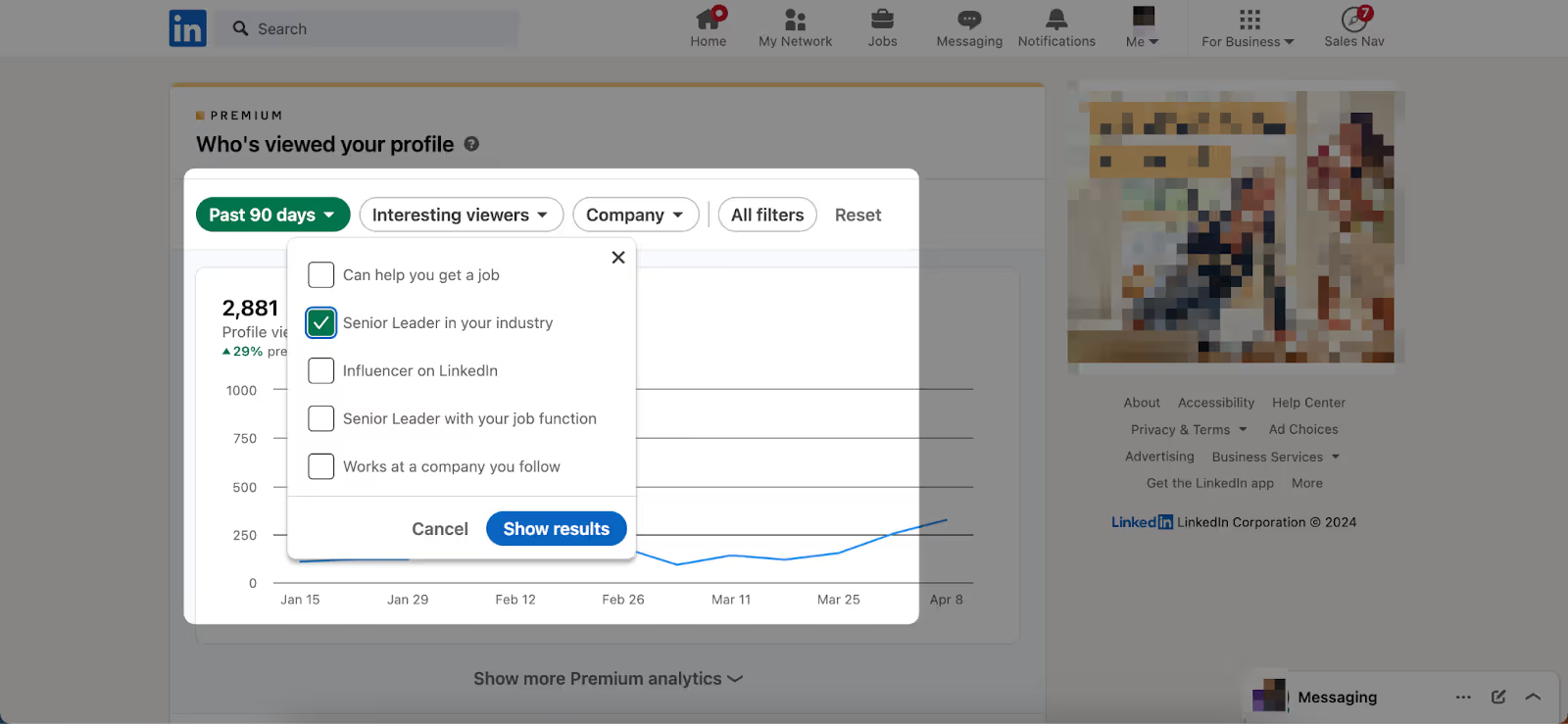
Timing can also make a difference. Reaching out relatively soon, say a few hours, after a profile visit may improve the likelihood of recognition, especially if the interaction happened through recent content or ongoing discussions. Waiting too long will reduce the probability of them remembering you.
4. Use LinkedIn Search Filters to Find Exactly the Right People
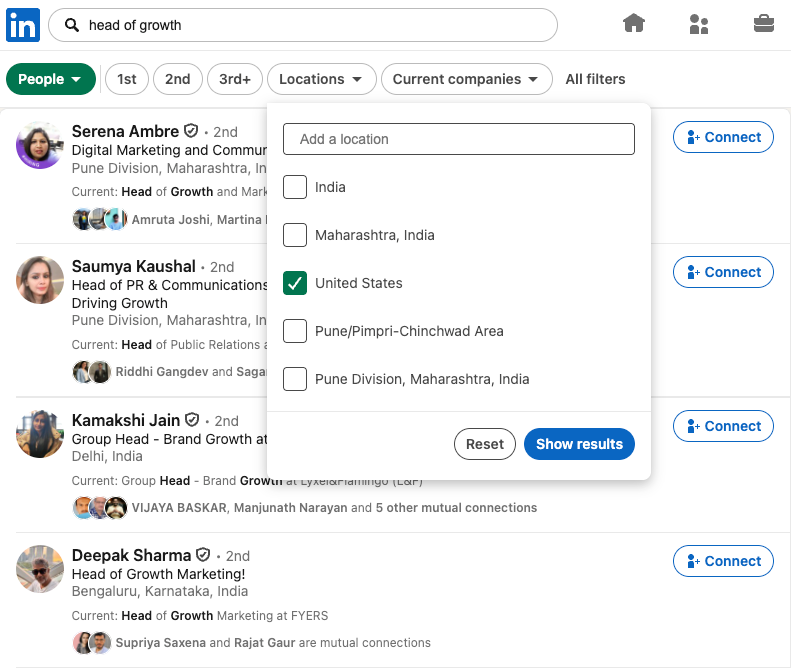
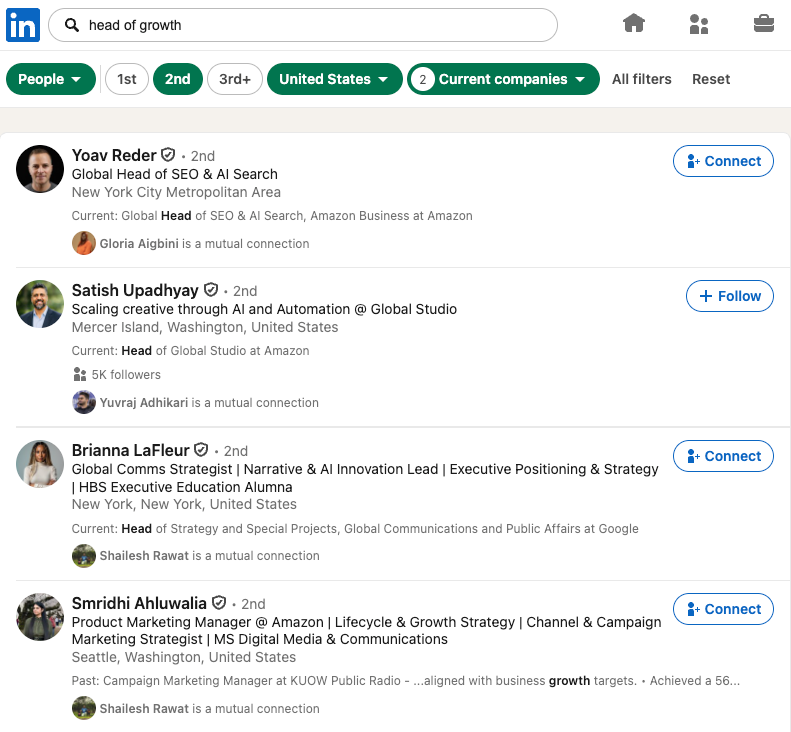
If you wish to add a very specific category of leaders to your network, you can take the help of LinkedIn’s filtering options:
- Type in a domain of your interest in the Search bar. You can type in the most commonly used keywords related to the domain or look up companies and names, too.
- Choose which aspect of the search results you want to explore further. You can choose between people, posts, companies, locations, degrees of connection, events, and many more.
- Click on “People” to know accounts, “Posts” to find relevant active members, and “Groups” to be part of a community.
- Set a few filters and you will see a list of highly qualified leads for your network. You can begin your connection with them and enhance your circle.
5. Groups & Events
LinkedIn Groups & Events are mass networking opportunities. Through LinkedIn Groups & Events, you can gain access to communities of people who are connected with one another through a common goal, interest, affiliation, or company. You can become part of a strong entrepreneur leadership network.
Joining Groups can open up doors to partnerships, conversations, deals, and outsourcing possibilities. You usually have to request to join a group and are expected to meet the set criteria to be accepted. Once in, you can post relevant content here, answer questions, hold discussions, and participate in group activities.
LinkedIn Events are live hostings for the public that are free to create and be part of. These include workshops, casual meetups, and webinars. A lot of business leaders launch scheduled LinkedIn Events and send out invitations for special attendees. By partaking in one of such Events, you can gain instant access to 100+ potential collaborators and thought leaders at once (you can view the number of attendees per event).
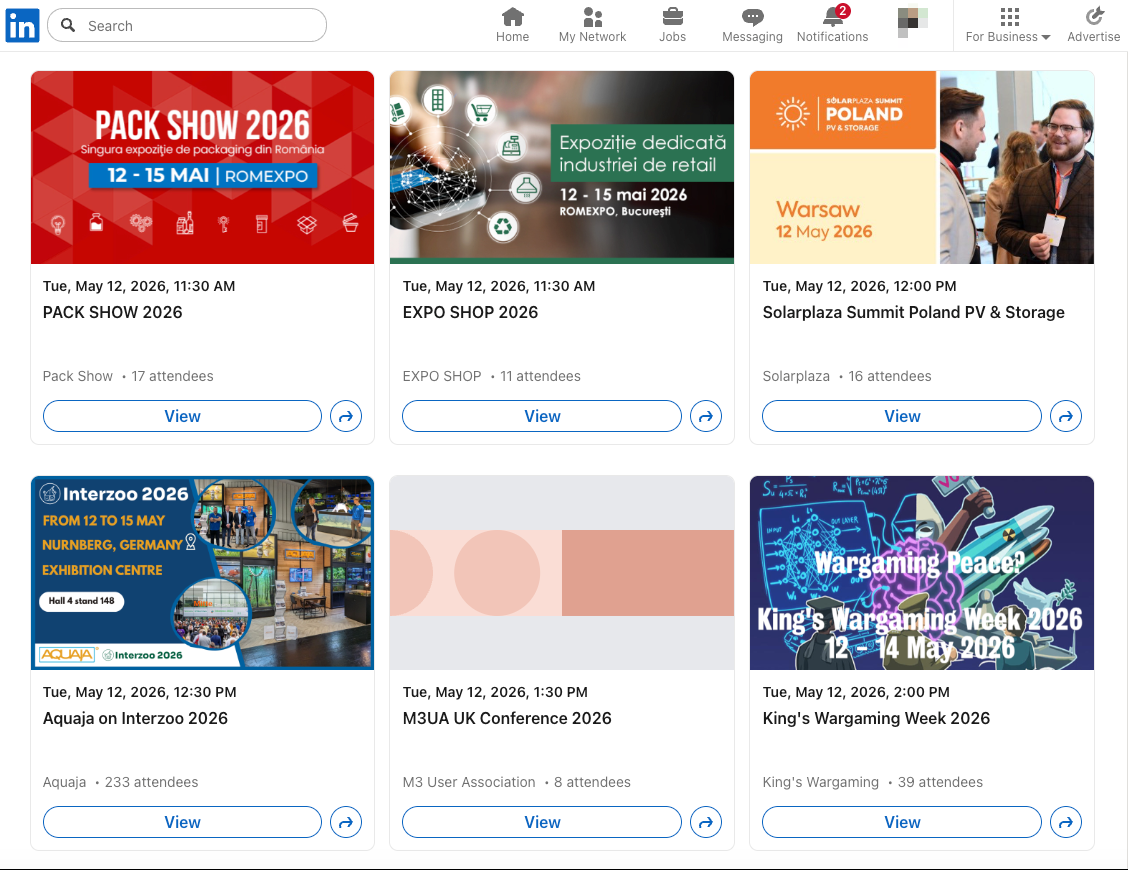
Events can help you promote your business, find new connections, collaborate with domain experts, and interact with a whole new crowd of people who can take your work forward through word of mouth. You can search for upcoming events from your Home page, or simply visit https://www.linkedin.com/events/.

6. Proactive Organic Posting
The best way to increase your network and add noteworthy personalities to it is by maintaining a reputable digital brand on LinkedIn. How?
The answer is through proactive and consistent organic posting on your profile.
Build a content strategy around your domain of expertise and begin creating content around it. The more you put yourself out there, the better people will know you. You can update your profile regularly, post about your thoughts and opinions, or teach people about the subject matter you hold expertise in. Through this churning out of content, people will begin paying attention to you, and your network will expand naturally.

This conversation is a great proof of the benefits of proactive posting. The sender came across a post that Keyur put out. They reached out and communicated their admiration for Keyur’s content, thereby carrying the conversation forward and leading it to a collaboration opportunity.
With regular, thoughtful posting over time, you will begin seeing an influx of messages and connection requests from fellow executives, potential clients, business partners, investors, etc., and thus, you can steadily work on becoming part of an entrepreneur leadership network.
What to Do After Connecting on LinkedIn?: Turning New Connections Into Real Conversations
The connection request is permission to network, not the networking itself.
One of the best things you can do is follow up within a reasonable timeframe while the interaction is still fresh, for instance, within 48 hours. Send a short message that references something specific from their profile or recent content.
A good opener might be: "Thanks for connecting. Been following some of your posts recently and really liked your take on [topic]. Looking forward to staying in touch here.”
This is frictionless, genuine, and gives them something easy to respond to.
From there, nurture the relationship gradually. Engage with their posts over the next few weeks. Share something useful if it crosses your path. Check in when they announce a milestone. Meaningful networking is a series of small, genuine touchpoints that build trust over time. The connections that become your strongest professional relationships are almost always the ones you invested in consistently, not the ones you messaged once and forgot.
Common LinkedIn Networking Mistakes to Avoid
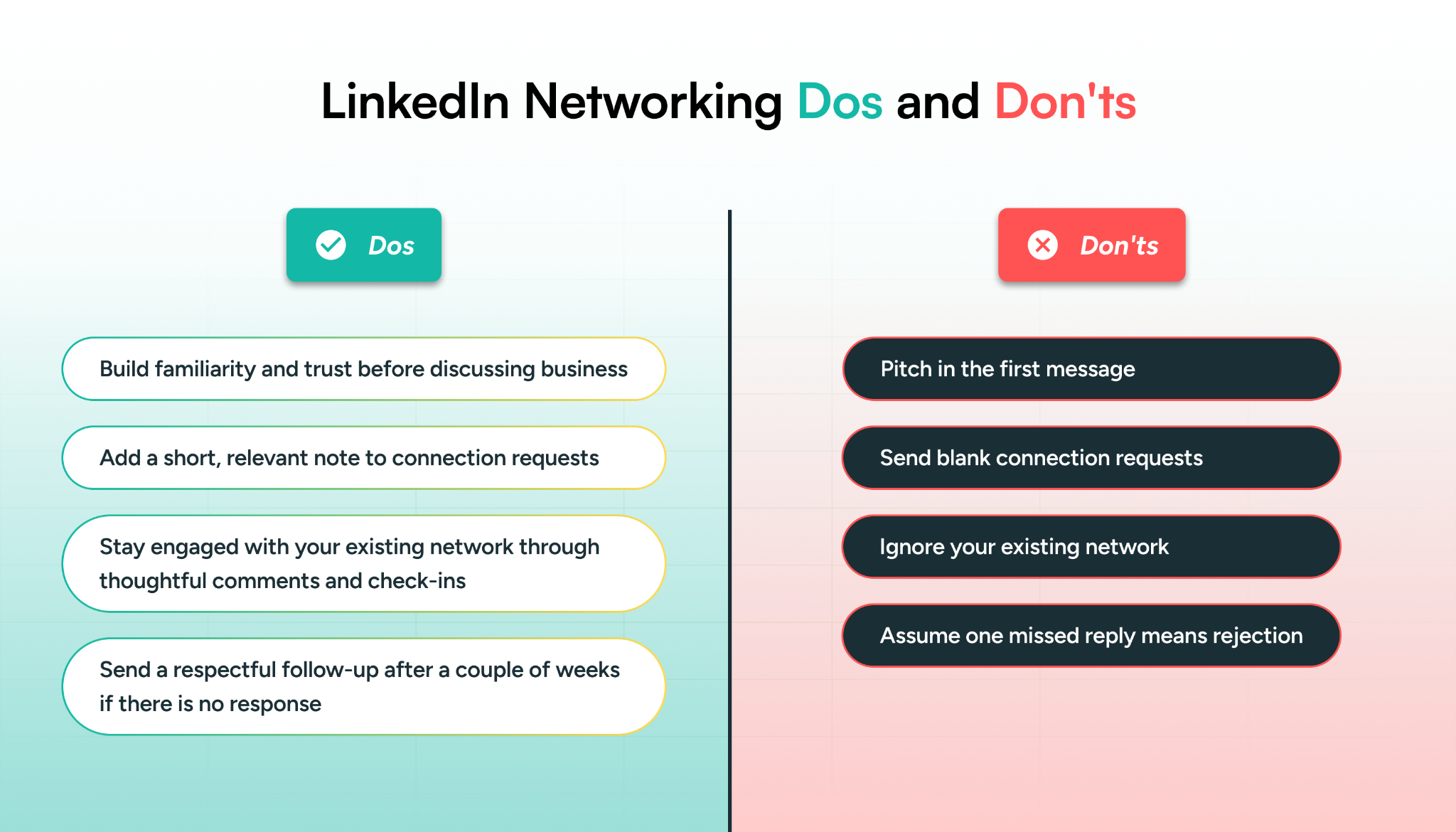
Even experienced professionals fall into networking habits that eventually undermine their relationship-building efforts. Here are the most common ones to watch out for:
Pitching in the First Message
One of the fastest ways to damage a potential relationship is to turn a new connection into an immediate sales conversation. When someone accepts your request and instantly receives a pitch, the interaction feels transactional rather than genuine.
Lead with curiosity and genuine interest. If there is a business opportunity worth exploring, it will emerge more naturally over time.
Sending Blank Connection Requests
A blank connection request gives the recipient very little context about who you are or why you want to connect. In most cases, it feels rushed, impersonal, or mass-sent.
Even a short personalized note mentioning shared interests, mutual context, or something specific about their work can make a meaningful difference.
Ignoring Your Existing Network
Many professionals spend their energy on adding new connections while barely interacting with the people already in their network.
Existing connections have the potential to become some of your most valuable long-term relationships. Staying engaged through thoughtful comments, congratulations, introductions, or occasional check-ins helps strengthen familiarity and trust over time.
Professional networks tend to compound gradually through consistent interaction, not just constant expansion.
Giving Up After One Unanswered Message
Not every message receives an immediate reply, especially on a platform where many professionals manage crowded inboxes and busy schedules.
A polite follow-up after a couple of weeks, especially if you reference something new related to their work or recent activity, is usually reasonable and professional. The key is to remain respectful and avoid turning follow-ups into repeated pressure.
LinkedIn Sales Navigator: How to Leverage It for Networking?
LinkedIn Sales Navigator is a powerful B2B sales tool that can transform the way leaders interact with one another. It allows you to set even more filters and gain higher visibility than you could with the basic, default account. Here’s how to go about it:
Step 1: Define Who You Are Looking For
A leads list is a tally of profiles that fit into your ICP. It helps you perform social selling better by filtering and categorizing profiles.
To create a leads list, go to Sales Navigator and click on “Leads Filters”. This is what you will see:
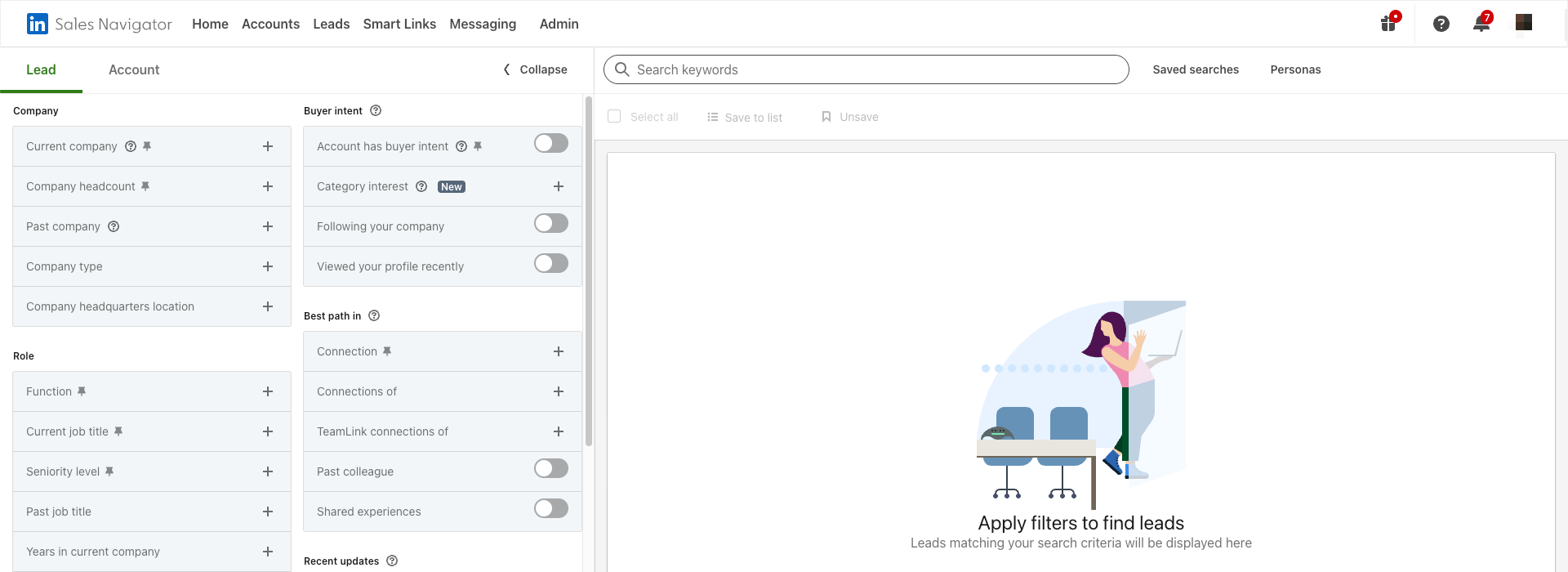
Begin adding the data that relates to your ICP the most. Let’s say that you wish to network with individuals from Google Operations Center and Google DeepMind specifically for a certain project. Set the corresponding filter accordingly:
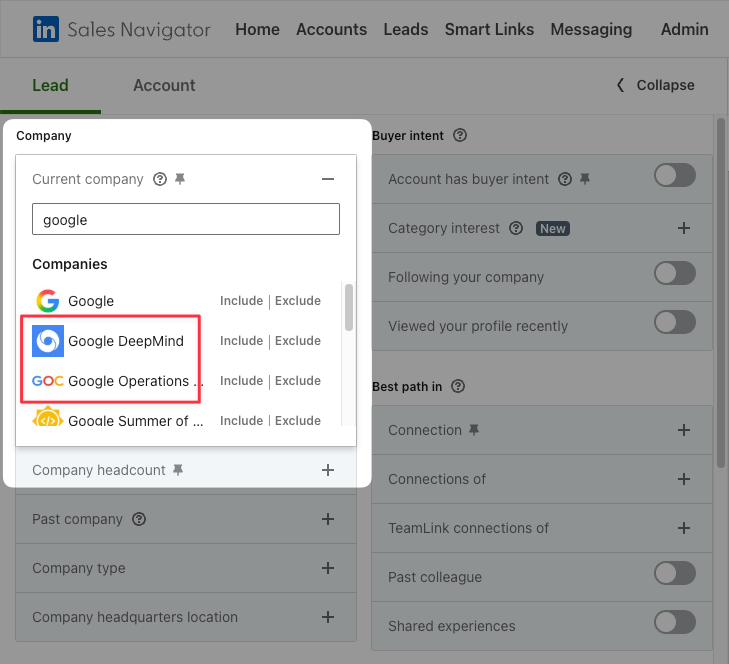
Similarly, you can set other filters and narrow down to a handful of personas that you would want to network with:

Step 2: Generate a Leads List
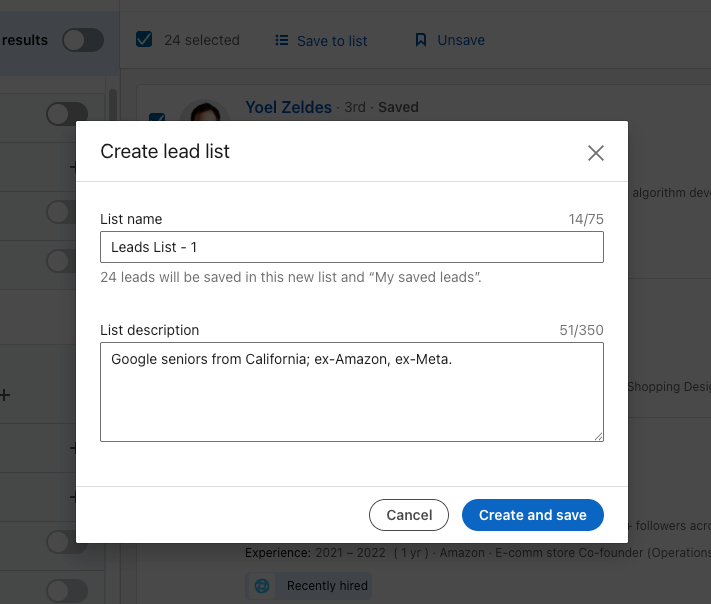
Once your filters are set, add these profiles to a leads list. You will thus be saving these accounts for future reference. You can even create multiple parallel lead lists so that your network-related outreach can be maximized.
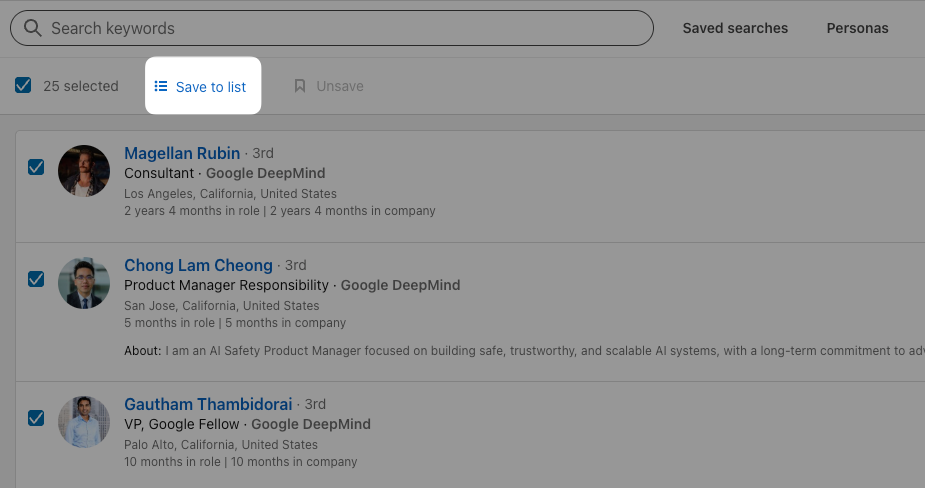
Type in your description to help you navigate through multiple lists later and save the list. Now, not only will you be able to go back to these very accounts, but over time, you’ll also be served system-recommended leads along the same lines by Sales Navigator. You can keep track of these profiles’ activities and edit the list as and when your requirements change.
Step 3: Create a Personalized Message
Once you have your leads in place, start reaching out to them with the pure intent of networking and getting to know them better. You must remember that unless you include a purpose, value, and CTA in the InMail or connection request, there are low chances that you will get a reply. Personalize the subject line and messaging according to their work, profile, and life. Here’s an example:
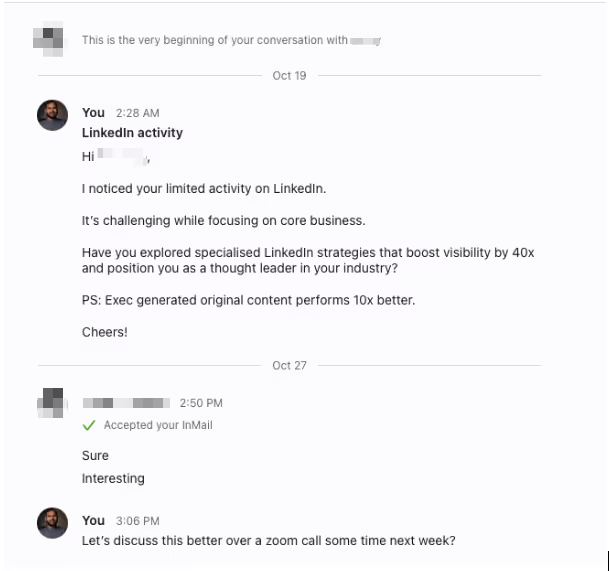
By such personalized and deliberate outreach, you can strike up conversations and make your time on LinkedIn worthwhile by spending it only on people you wish to invest in in the long term.
3 LinkedIn Sales Navigator Networking Tips
LinkedIn Sales Navigator does more than help you find people. It gives you access to signals and insights that can make your networking far more effective. It shows you the number of days that a certain profile has been active, the exact people who viewed your profile, the number of searches performed, the rate of acceptance of InMails (direct messages with profiles that aren’t connected yet), and more.
A Forrester study revealed that incorporating LinkedIn Sales Navigator into your network expansion and lead generation efforts can produce a 312% return on investment within 3 years. This immense potential makes the tool indispensable when you talk about strong networking strategies on social media.
Let’s move on to 3 lesser-known LinkedIn Sales Navigator tips that can ensure the best results.
1. Personalization
LinkedIn Sales Navigator reveals a lot of activities that go on in a certain user’s profile, such as a recent job update or posted content. These signals can become natural conversation starters and make your outreach feel far more relevant.
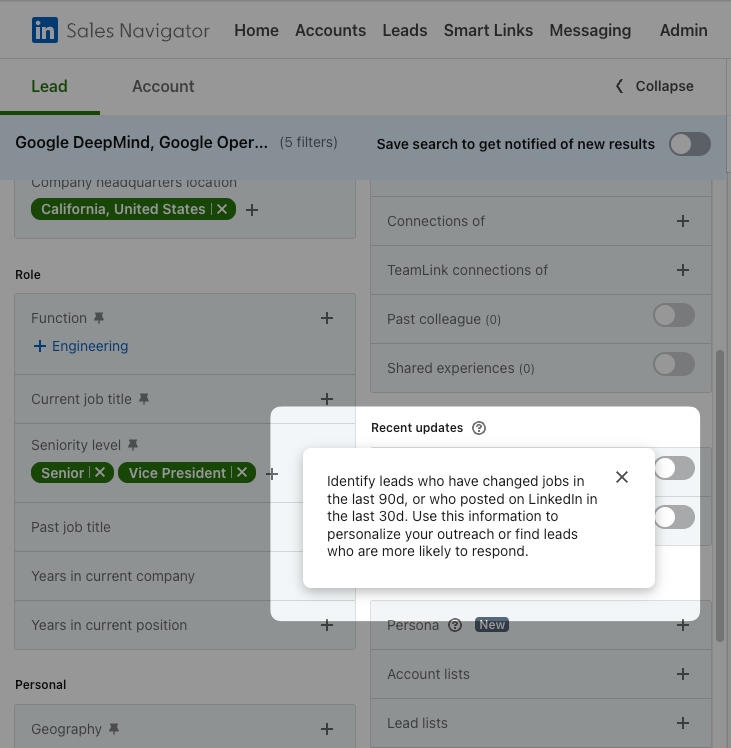
Take this opportunity to stay updated with what’s going on with potential connections on LinkedIn. When you begin a discussion based on updates in their lives, it leaves a good impression and can make the conversation less synthetic. Relatability can be a compelling reason for someone to accept your connection request or InMail. By leveraging this emotion, you can refine your networking capabilities.
2. Automation
Did you know that LinkedIn Sales Navigator lets you know which leads on your list go on to accept your connection requests and InMails?
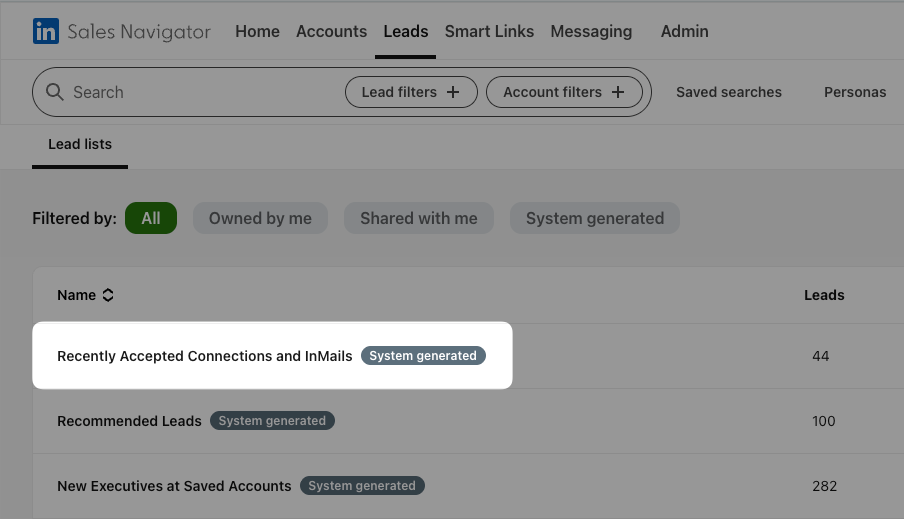
This information can unpack loads of conversational opportunities. Look out for this update when searching for potential connections in your leads list. Be it a business competitor or an ally, you can enrich your conversations with this opener.
3. Utilization
Sales Navigator users are entitled to only 50 InMail message credits per month. So it becomes imperative that you use each very deliberately by thoroughly analyzing your leads list and narrowing your outreach.
Here comes the third trade secret: “Open” profiles do not consume InMails!
An Open Profile is a LinkedIn Premium feature that allows you to send users direct messages without having to connect with them first, and without any cost of InMail count.
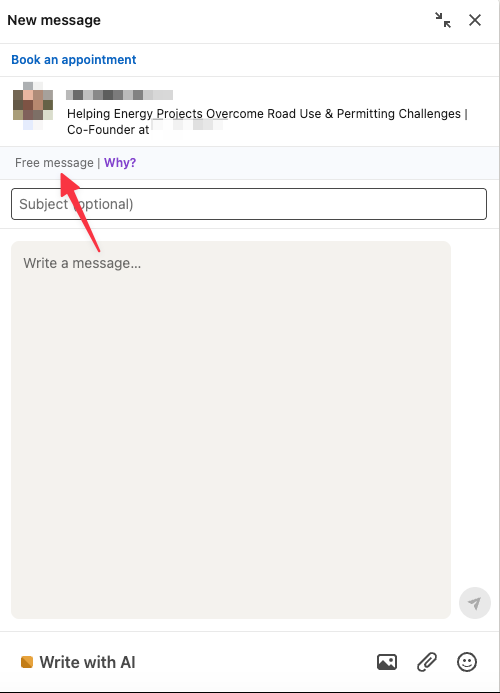
Fully utilize these free InMails and increase the number of users you reach out to. The more well-thought-out outreach messages you send, the more networking benefits you profit from.
Conclusion
Strong LinkedIn networking is not about collecting the highest number of connections, but about building visibility, trust, relevance, and genuine professional relationships over time.
From personalized connection requests and thoughtful engagement to strategic use of Sales Navigator, the professionals who benefit most from LinkedIn are the ones who approach networking with consistency and well-meaning intent. The platform rewards familiarity, credibility, and meaningful participation far more than transactional outreach.
If you wish to double down on networking strategies but need a helping hand, GrowedIn is your best bet. We help founders and executives build stronger LinkedIn positioning, visibility, and networking systems that can create viable business opportunities over time. Schedule a discovery call to discuss how your LinkedIn presence can drive stronger credibility and professional relationships.

Frequently Asked Questions
Why should I expand my network?
Expanding your LinkedIn network can expose you to new ideas, professional perspectives, collaborations, referrals, and career opportunities. Strong networking can also lead to partnerships, clients, mentorship, hiring opportunities, and long-term professional relationships that support both personal and business growth.
Should I post every single day to network better?
No, posting every day is not necessary. Consistency matters more than frequency. A smaller number of thoughtful, relevant posts combined with meaningful engagement and genuine conversations usually creates stronger networking outcomes than posting daily without clear value.
How much time should I put into LinkedIn networking?
LinkedIn networking does not demand mammoth efforts. Even 10–15 minutes a day can suffice. Create a leads list, prepare a template for outreach, and personalize the template for each InMail that you send out. Slowly but surely, your network will grow in quantity and quality.
Should I get a LinkedIn Sales Navigator Advanced plan?
It depends on your goals. For most professionals focused primarily on networking, the Core Sales Navigator plan for individual users is often enough. Advanced plans are usually more beneficial for organizations running collaborative B2B sales, outreach, recruiting, or account-based networking efforts at scale.
What kind of leaders can I network with?
You can network both vertically and horizontally. Vertical networking involves connecting with professionals within your own industry or specialization, while horizontal networking involves building relationships with professionals from different industries, backgrounds, or functions. Both approaches can provide valuable insights, opportunities, and perspectives.
How to Build a Strong LinkedIn Network in 2026
- Effective networking on LinkedIn is defined by mutual value exchange, not just follower growth or superficial connections.
- The platform prioritizes professional identity, rewarding expertise, credibility, and work-based achievements over lifestyle content.
- Building a strong network starts with personalized connection requests that establish context, intent, and relevance.
- Active engagement with posts and communities helps users organically attract and connect with relevant professionals.
- Profile views and LinkedIn Premium insights can be used to identify warm leads and initiate timely conversations.
- Advanced search filters and Sales Navigator enable highly targeted networking with specific roles, industries, and decision-makers.
- Consistent, high-quality content posting is a key driver of inbound networking and long-term authority building.
- Strategic follow-ups and relationship nurturing after connecting are essential to convert connections into meaningful professional relationships.


Insights Hub
Want to explore how this applies to your brand?
Let’s talk.
